
Interest Accrual
Aura accrues interest on a daily basis on all interest bearing balances in accounts and contracts. Interest is accrued on credit and the debit balances separately. Interest accrual is always done on value-dated balances for all current, savings accounts, fixed deposits and loan contracts. For Card accounts however there is a choice between book-dated balances or value-dated balances for calculating interest accrual for a given balance -- Debit or Credit.
Aura stores the calculated Interest accrual amount up to 10 decimal places. For accrual accounting entries and during liquidation of the accrued interest, Aura will Round Up, Down or Near, based on the decimal digits and Rounding type selected for the account currency (in Currency Maintenance). Accrual rounding off is done on the basis of cumulative value of accrual and not on the daily accrued amount. This ensures that the bank does not take a loss (however small per account) in case of a debit balance and the customer does not take a loss (however small) in case of a credit balance. The effect is clearly visible if accrual is not posted daily, but calculated and kept on daily basis and totaled and then rounded off (say on monthly basis or during liquidation). If this is done then the effect of the rounding off difference is clearly visible; and hence Aura rounds off adjustments in accrual.
Formula for Interest calculation
Interest for One day = PNR / 100 = Principal * [(Interest rate) / (Number of days in a year *100)]
Note:
Principal: Is arrived at using the On Balance -- whether Daily, or Period End; and Balance Amount Type -- whether Book Dated or Value Dated, as chosen for the Account
Interest rate: Is arrived at using the Interest Scheme mapped to the Account
Number of days: Is arrived at based on the 'Interest year' setting from the Interest scheme.
Numerator: In case On Balance is Daily, the Numerator is always taken as 1. In case it is Period End, the Numerator is taken as (current date -- last interest liquidation date).
Denominator: The denominator and the number of days in a month on which the interest accrual is done vary depending on the Interest Year chosen.
Table below explains 'Number of days' in month and year to consider for interest calculation based on Interest year set at Interest Scheme.
| Interest Year | Number of days in a month on which accrual is done | Number of days in a year (Denominator) |
|---|---|---|
| Actual / 360 | Accrual is done every calendar day. | 360 |
| Actual / 365 | Accrual is done every calendar day | 365 |
| 30- EUR / 360 | Accrual is done for 30 days in a month, irrespective of the number of actual calendar days in the month. If a month has 31 days, the interest accrual on the 31st day is skipped If a month has less than 30 days, the interest accrual is accordingly repeated on the last calendar day of the month. Example: In case of February, on 28th, accrual will be done for 3 days; and if it is a leap year, on 29th, accrual will be done for 2 days. | 360 |
| 30- EUR / 365 | Accrual is done for 30 days in a month, irrespective of the number of actual calendar days in the month. If a month has 31 days, the interest accrual on the 31st day is skipped If a month has less than 30 days, the interest accrual is accordingly repeated on the last calendar day of the month. Example: In case of February, on 28th, accrual will be done for 3 days; and if it is a leap year, on 29th, accrual will be done for 2 days. See example below | 365 |
| Actual / Actual | Accrual is done every calendar day. | Actual number of days in a year – 365 for non-leap years and 366 for leap years |
The following table shows the interest accrual for the month of February (28days) if the Interest year is EUR-30 / 365
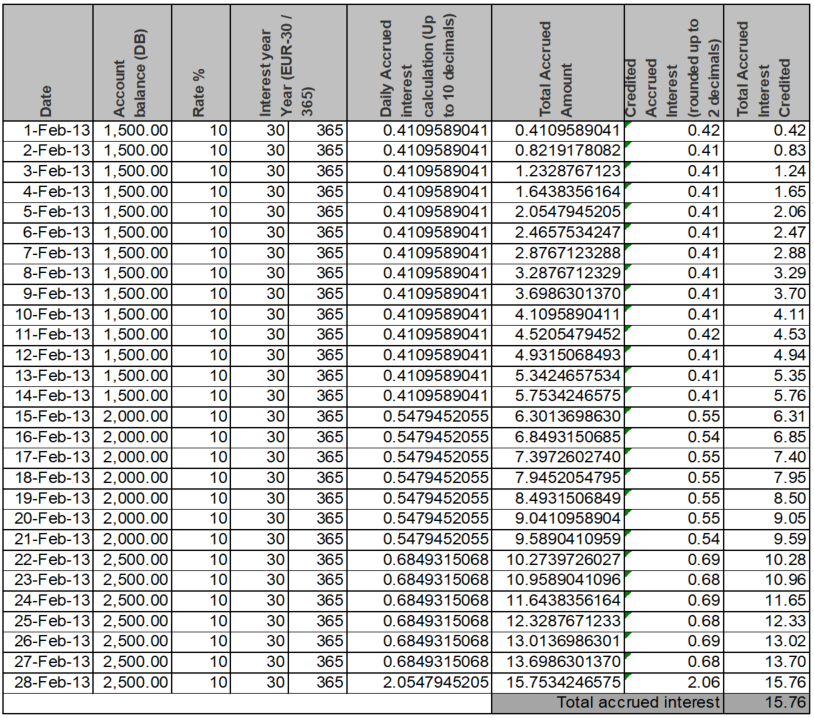
Note: In the above example, on 28-Feb-13, accrual has been posted for the actual accrual of 28-Feb-13 plus 2 additional days, since the interest is to be calculated for 30 days.
Different ways to arrive at the Principal amount
Aura provides the following options to arrive at the Principal amount (using the On Balance field for Accounts)
1. Daily Balance
2. Period End Balance
Daily
This approach uses the balance amount on the account as at the End of Day (EOD) as Principal amount and then calculates interest.
Examples for the Interest calculation
A few examples are provided below showing how the interest accrual is calculated for an Account depending on when the account is opened / closed. Note that all the examples use the following parameters:
The account is a Card Account
Interest year is Actual / Actual.
Currency is EUR (Account currency).
Rounding type is Up.
Scenario 1 : Account is created in between a month and closed before the period end.
In the below example, 20-Jan-13 is the Period start and 20 Feb-13 is the Period end.
However if the Account gets closed on 27-Jan-13, then Interest will get liquidated on 27-Jan-13 for the interest accrued until 26-Jan-13.
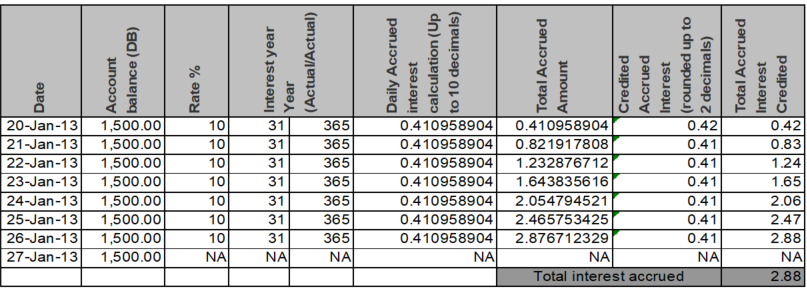
In the above scenario, Account is closed on 27-Jan-13. No interest will be accrued on 27-Jan-13. Interest will be accrued until 26-Jan-13 and liquidated on 27-Jan-13. Please refer to the Additional Topics > Interest Liquidation user manual for more information on Interest liquidation.
Scenario 2 : Normal Interest receivable accrual-Period Start to Period End.
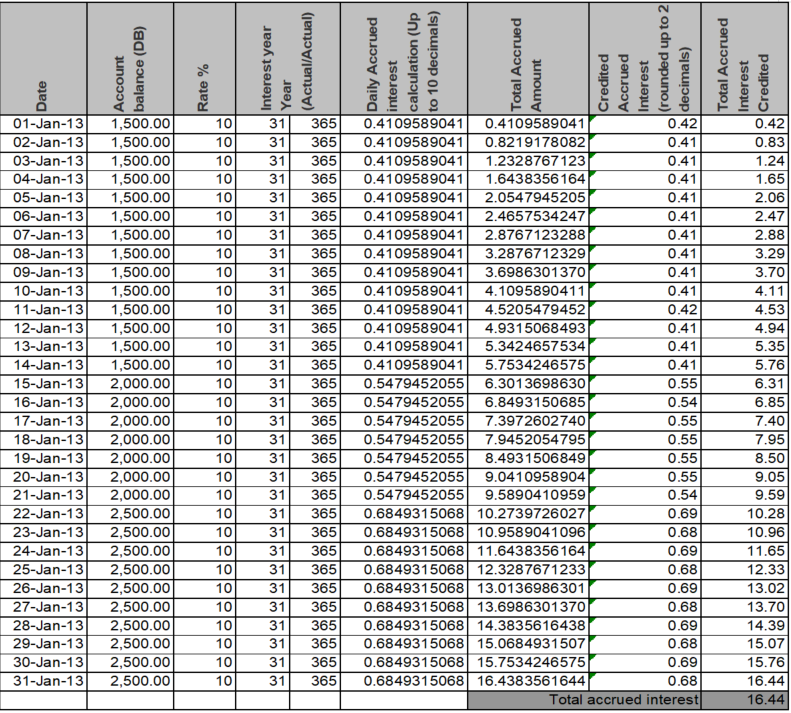
- In the below example, 01-Jan-13 is the Period Start and 31-Jan-13 is the period end. Interest will get liquidated on 31-Jan-13.
- When accrual for Within Limit interest receivable is successful following accounting entries are posted
| Account / GL | Transaction Code | Book date | Value date | Currency | Amount | Debit / Credit |
|---|---|---|---|---|---|---|
| GL mapped for the Product as ‘Authorised interest receivable accrued – Asset’ | Transaction Code mapped for the Product as ‘Interest accrued - within limit (DB / GL)’ | Accrual date | Accrual date | Account currency | Accrued amount | Debit |
| GL mapped for the Product as ‘Authorised debit interest – Income’ | Transaction code mapped for the product as ‘Interest accrued - within limit (CR / GL)’ | Accrual date | Accrual date | Account currency | Accrued amount | Credit |
- When accrual for Over Limit interest receivable is successful following accounting entries are posted.
| Account / GL | Transaction Code | Book date | Value date | Currency | Amount | Debit / Credit |
|---|---|---|---|---|---|---|
| GL mapped for the Product as ‘Overlimit interest receivable accrued – Asset’ | Transaction Code mapped for the Product as ‘Interest accrued - over limit (DB / GL)’ | Accrual date | Accrual date | Account currency | Accrued amount | Debit |
| GL mapped for the Product as ‘Overlimit interest – Income’ | Transaction code mapped for the product as ‘Interest accrued - over limit (CR / GL)’ | Accrual date | Accrual date | Account currency | Accrued amount | Credit |
- When accrual for Overdue interest receivable is successful following accounting entries are posted
| Account / GL | Transaction Code | Book date | Value date | Currency | Amount | Debit / Credit |
|---|---|---|---|---|---|---|
| GL mapped for the Product as ‘Overdue interest receivable accrued – Asset’ | Transaction Code mapped for the Product as ‘Interest accrued - Overdue (DB / GL)’ | Accrual date | Accrual date | Account currency | Accrued amount | Debit |
| GL mapped for the Product as ‘Overdue interest – Income’ | Transaction code mapped for the product as ‘Interest accrued - Overdue (CR / GL)’ | Accrual date | Accrual date | Account currency | Accrued amount | Credit |
- When accrual for Interest payable is successful following accounting entries are posted
| Account / GL | Transaction Code | Book date | Value date | Currency | Amount | Debit / Credit |
|---|---|---|---|---|---|---|
| GL mapped for the Product as ‘Interest paid – Expense’ | Transaction code mapped for the product as ‘Interest accrued – payable (DB / GL)’ | Accrual date | Accrual date | Account currency | Accrued amount | Debit |
| GL mapped for the Product as ‘Accrued interest payable – Liability’ | Transaction Code mapped for the Product as ‘Interest accrued – payable (CR / GL)’ | Accrual date | Accrual date | Account currency | Accrued amount | Credit |
Scenario 3 : Catch-up accrual of past value dated entry in the same cycle.
Continuing with the same example, if there is a past value-dated reversal recorded for Value-date 02- Jan-13 on Book-date 11-Jan-13 for 300.00; Aura does the catch-up accrual from 2-Jan-2013 till 10- Jan-2013 (9 days) for the revised debit balance of 1,200.00 as depicted in the below example.
The accrual from 2-Jan-2013 until 10-Jan-2013 is checked and system posts adjustment entry. It recalculates the new accrual, highlighted in Red in the below example. The earlier accrual will then be compared with the new accrual when there is a past value dated entry and the difference amount is posted as a correction (positive or negative) as an adjustment entry.
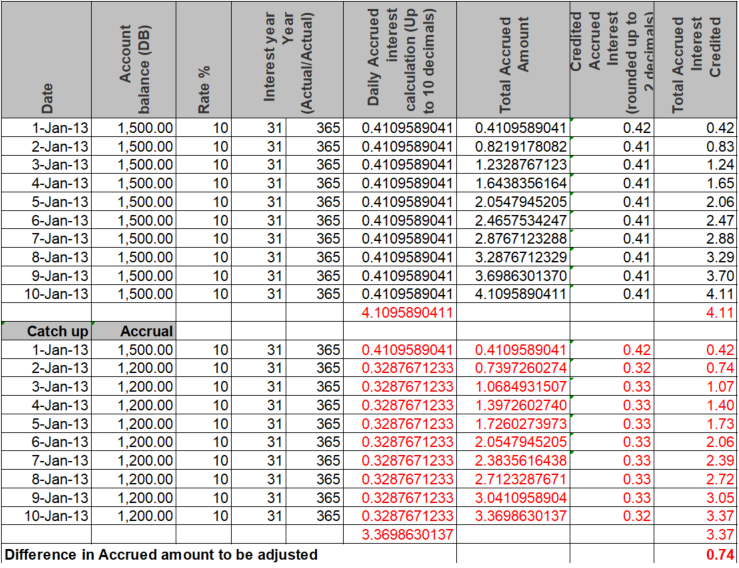
In the above example the back value dated entry is posted on 11-Jan-13. System will compare the older accrual with the New accrual from 2-Jan-13 until 10-Jan-13 (9 days). The difference amount will be posted as an adjustment entry on 10-Jan-13.
For the difference amount, the following entry will be passed, with a negative amount, as the interest receivable
| Account / GL | Transaction Code | Book date | Value date | Currency | Amount | Debit / Credit |
|---|---|---|---|---|---|---|
| GL mapped for the Product as ‘Authorised interest receivable accrued – Asset’ | Transaction Code mapped for the Product as ‘Interest adjustment – (DB / GL)’ | 11-Jan-13 | 10-Jan-13 | Account currency | (-) 0.74 | Debit |
| Interest adjustment – Income | Transaction Code mapped for the Product as ‘Interest adjustment - (CR / GL)’ | 11-Jan-13 | 10-Jan-13 | Account currency | (-) 0.74 | Credit |
Scenario 4 : Catch-up accrual of past value dated entry in the previous cycle.
Continuing with the above example, where:
Cycle 1 Start date — 01-Jan-13

Cycle 1 End date — 31-Jan-13

Cycle 2 Start date — 01-Feb-13

Cycle 2 End date — 28-Feb-13.
Continuing with the example, if there is a past value-dated reversal recorded for Value-date 28-Jan-13 on Book-date 06-Feb-13 for 300.00; Aura first does the catch-up accrual from 28-Jan-2013 until 31-Jan-2013 and posts an adjustment entry in the end of Cycle 1 (4 days); and will again do a catch-up accrual for Cycle 2 from 01-Feb-2013 until 05-Feb-2013 (5 days).
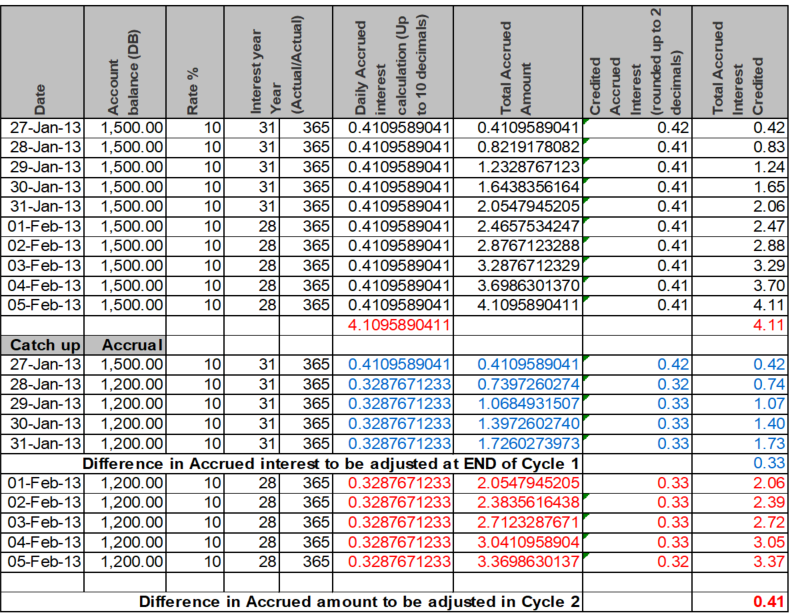
In the above scenario Aura will post two adjustment entries as per below
a) One with value date as on the liquidation date of the previous cycle (28-Jan-13 to 31-Jan-13 -- 4 days) -- Highlighted in Blue.
| Account / GL | Transaction Code | Book date | Value date | Currency | Amount | Debit / Credit |
|---|---|---|---|---|---|---|
| GL mapped for the Product as ‘Authorised interest receivable accrued – Asset’ | Transaction Code mapped for the Product as ‘Interest adjustment – (DB/ GL)’ | 6-Feb-13 | 31-Jan-13 | Account currency | (-) 0.33 | Debit |
| Interest adjustment – Income | Transaction Code mapped for the Product as ‘Interest adjustment (CR / GL)’ | 6-Feb-13 | 31-Jan-13 | Account currency | (-) 0.33 | Credit |
b) Two, with the value date of the previous day when the transaction is posted (1-Feb-13 to 5-Feb-13 -- 5 days) -- Highlighted in Red.
| Account / GL | Transaction Code | Book date | Value date | Currency | Amount | Debit / Credit |
|---|---|---|---|---|---|---|
| GL mapped for the Product as ‘Authorised interest receivable accrued – Asset’ | Transaction Code mapped for the Product as ‘Interest adjustment – (DB/ GL)’ | 6-Feb-13 | 5-Feb-13 | Account currency | (-) 0.41 | Debit |
| Interest adjustment – Income | Transaction Code mapped for the Product as ‘Interest adjustment (CR / GL)’ | 6-Feb-13 | 5-Feb-13 | Account currency | (-) 0.41 | Credit |
Period End
This approach uses the period end balance as the Principal amount for whole period and interest is calculated on that amount.
Since Aura accrues interest on a daily basis while the account could have a period end as monthly, Aura assumes every day as a period-end and calculates accrual with the end of day balance as of current day. Therefore on a daily basis accrual is adjusted to suit the balance movement in the account all along assuming that the end of day balance will be the period end balance in the account. This iteration goes on until the period end and on the last day of the period the total accrued amount qualifies for interest liquidation.
This approach provides banks with daily accrual even for period-end based balances so that banks can comply with daily accrual requirements for further downstream calculations.
Normal Interest receivable accrual-Period Start to Period End.
01-Jan-13 is the start of period and 31-Jan-13 is the period end. Interest will get liquidated on 31st January.
Balance on account from 1-Jan-13 to 14-Jan-13 is 1,500.00 and from 15-Jan-13 to 31-Jan-13 the balance is 2,000.
CC will post an entry for the difference amount (positive or negative) on the date when there is a change in balance. System will do a catch up accrual and calculate the difference in accrual w.r.t current balance and calculate the same from period start date. Previous accruals with old balance will not change.
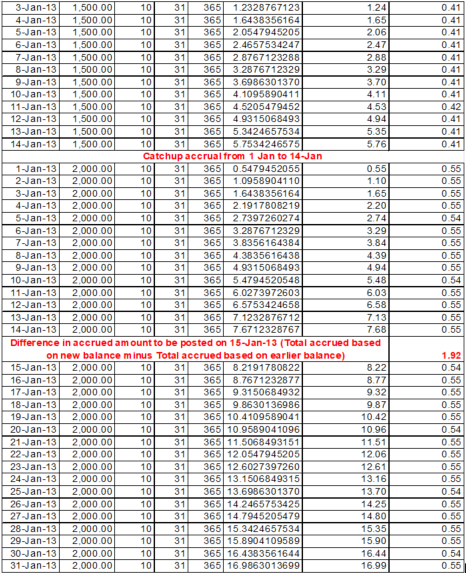
a) Accounting entries from 1st to 14th Jan
| Account / GL | Transaction Code | Book date | Value date | Currency | Amount | Debit / Credit |
|---|---|---|---|---|---|---|
| GL mapped for the Product as ‘Authorised interest receivable accrued – Asset’ | Transaction Code mapped for the Product as ‘Interest accrued - within limit (DB / GL)’ | Accrual date | Accrual date | Account currency | Accrued interest | Debit |
| GL mapped for the Product as ‘Authorised debit interest – Income’ | Transaction code mapped for the product as ‘Interest received - within limit (CR / GL)’ | Accrual date | Accrual date | Account currency | Accrued interest | Credit |
b) Accounting entry on 15th Jan.
| Account / GL | Transaction Code | Book date | Value date | Currency | Amount | Debit / Credit |
|---|---|---|---|---|---|---|
| GL mapped for the Product as ‘Authorised interest receivable accrued – Asset’ | Transaction Code mapped for the Product as ‘Interest accrued - within limit (DB / GL)’ | 15-Jan-13 | 15-Jan-13 | Account currency | Accrued interest of 15-Jan-13+ difference of interest because of catch up = 1.92+0.54 = 2.46 | Debit |
| GL mapped for the Product as ‘Authorised debit interest – Income’ | Transaction code mapped for the product as ‘Interest received - within limit (CR / GL)’ | 15-Jan-13 | 15-Jan-13 | Account currency | Accrued interest of 15-Jan-13 + difference of interest because of catch up = 1.92+0.54 = 2.46 | Credit |
c) Accounting entries from 16th to 31st Jan.
| Account / GL | Transaction Code | Book date | Value date | Currency | Amount | Debit / Credit |
|---|---|---|---|---|---|---|
| GL mapped for the Product as ‘Authorised interest receivable accrued – Asset’ | Transaction Code mapped for the Product as ‘Interest accrued - within limit (DB / GL)’ | Accrual date | Accrual date | Account currency | Accrued interest | Debit |
| GL mapped for the Product as ‘Authorised debit interest – Income’ | Transaction code mapped for the product as ‘Interest received - within limit (CR / GL)’ | Accrual date | Accrual date | Account currency | Accrued interest | Credit |