
Loan Status
Loan Status allows you to define any number of account statuses for loan accounts and define the action to be done at each status. Each account status will have corresponding preferences like Disallow disbursement, Stop invoice etc. These statuses can be used in the Rule Builder of Loan Product to automatically move the accounts to various statuses based on business rules.
The following are the various tabs that appear on the Loan Status page.
To add a new Status record,
1. From Menu click Admin, then click Status and then Loan status. Loan Status Search Page appears.

2. Click Add. New Loan Status → Profile (1/2) page appears.
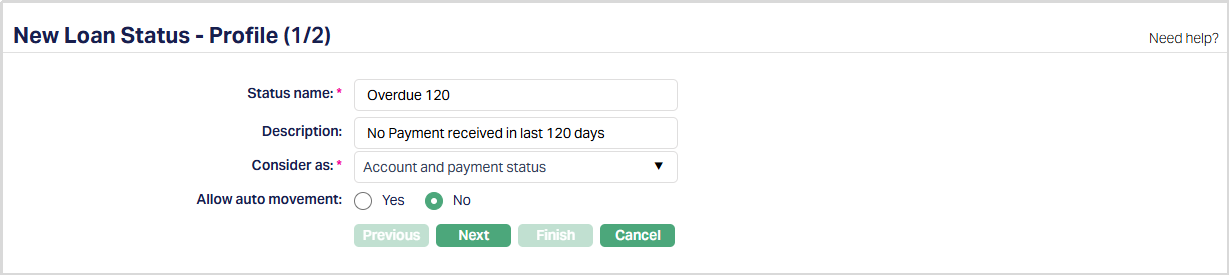
3. Enter name of the status in the Status name field.
4. Enter Description for the status.
5. Select Consider as from the drop-down list of Pre-shipped values. The values are Account Status, Payment Status, Account and Payment status. If Payment Status option is selected, then the Allow auto movement field will not appear.
6. Select Yes or No radio button for Allow auto movement. When an account reaches this status, the Allow auto movement flag will be defaulted into the account from this maintenance. If Allow auto-movement is No, the account status will not automatically move even if the account satisfies the Rules maintained in the product's Rule Builder tab. However, if Allow auto movement is selected as Yes, then the account status will change automatically, as per the Rules in the Rule Builder tab.
7. Click Next. New Loan Status → Confirmation (2/2) page appears.
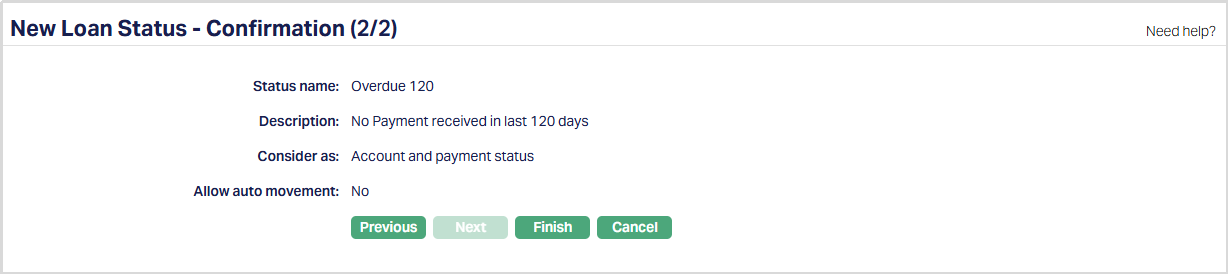
Note: If custom field is mapped to Loan Status under Admin → System Codes → Custom fields → Field mapping, then an additional screen will appear before the confirmation screen. The custom fields will be mandatory or non-mandatory based on the rules set at the Field mappings. For more detail on custom field functionality please refer Admin → System codes → Custom fields → Field mappings manual.
8. Click Finish. Loan Status page appears displaying the details of the Status you added. Status of the record is Active.
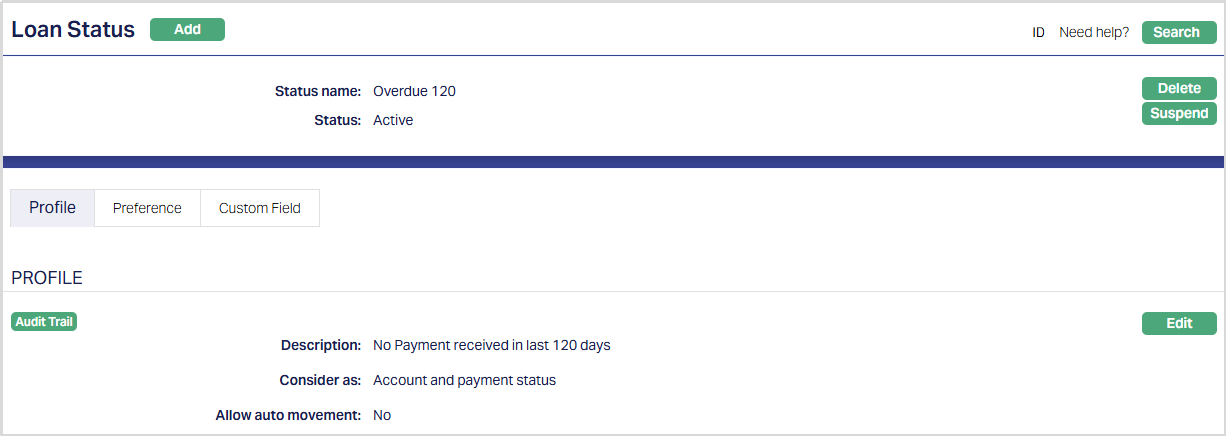
Functions: Add, Search, Delete, Suspend, Activate, Edit.
Delete: You can delete Loan Status record saved in Aura by a click on Delete button. Aura will ask for confirmation, on approving which the selected record will be deleted.
Suspend: You can suspend Loan status by clicking on Suspend button. When you click on Suspend button, Aura will ask for confirmation. On confirmation Aura will suspend the Loan and Activate button will appear in place of the Suspend button.
Activate: If you want to activate a suspended Loan Status record then click on Activate button. Aura will ask for confirmation. On confirmation Aura will Activate the Loan Status and Suspend button will appear in place of Activate button.
Profile
Profile tab, which is the default tab in Status screen, shows the basic Status details which were added in New Loan Status → Profile (1/2).
To Edit the Status,
1. Access Loan Status page. By default Profile tab will be displayed.

2. Click Edit. Edit Profile page appears.
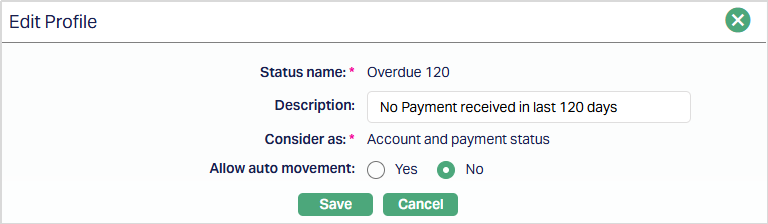
Note: Only Description and Allow auto movement fields are editable.
3. Click Save. Loan Status page appears with the edited details.
Functions: Edit.
Preference
Preference tab allows you to maintain the corresponding preferences that will apply to accounts which fall into the specific Loan status. Flexibility is provided in enabling or disabling specific preferences on accounts that reach a specific status.
To Edit Preferences,
1. Access Loan Status page and click Preference Tab.
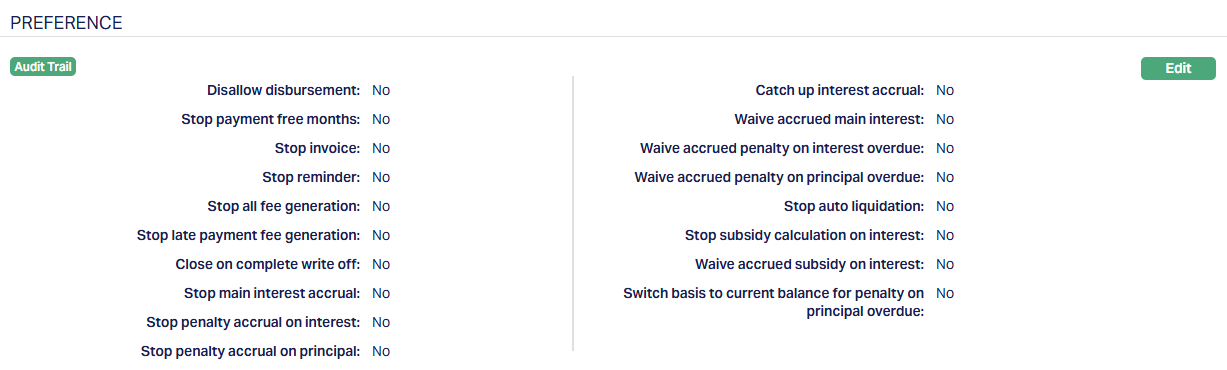
2. Click Edit. Edit Preference page appears.
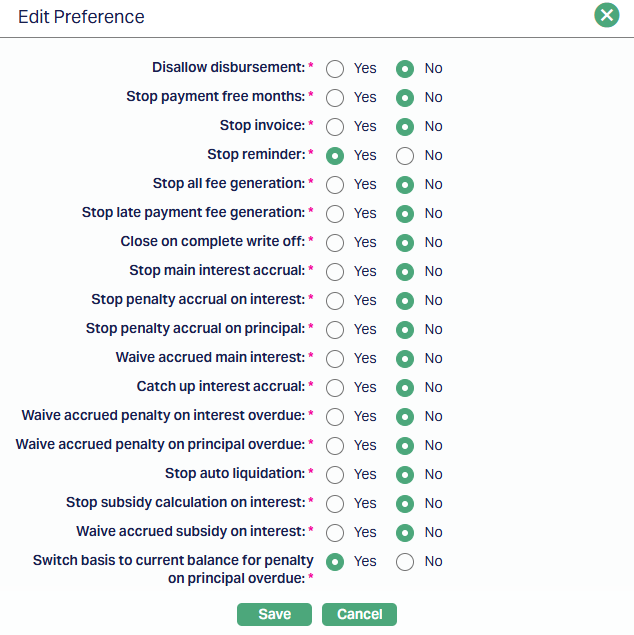
3. The following are the Preferences available for a user-defined status. All these are by default marked as No such that normal activities are allowed in the account:
a) Disallow disbursement: When the flag is marked as Yes, Aura will not allow you to disburse the loan amount to that account. Amount disbursed will not be allowed to be debited from the loan account. The loan amount will not be allowed to be disbursed when the disbursement option is Auto or Manual.
b) Stop Payment Free months: When the flag is marked as Yes, the Payment free months defined for the account will not be applicable on the account under the current status. If it is marked as No, then Payment free months defined at the account level will be applicable for the account under current status.
Note:
Payment free months are applicable for Consumer, Mortgage and Commercial loans. It has an impact on Instalment loans only and deferred loans are not considered.
Payment free months are for the type fixed months by default and consecutive months are allowed in case of loans.
For the payment free months, the payment schedule will display the due amount as zero. The next schedule based on the frequency will have the cumulative amount of principal, Interest and Charge components.
Invoice will be generated as due amount zero for Payment free months.
Payment free month must not be a maturity date/month.
c) Stop Invoice: When the flag is marked as Yes, no invoice will be generated for this account. This does not stop interest liquidation. Only invoice generation is stopped. If interest has to be stopped then the relevant flag (Stop main interest accrual) has to be marked.
d) Stop Reminder: When this flag is marked as Yes, Aura will not generate any reminder records for the loan account while it is under the current status. This applies to all reminder types configured in Aura, including payment due reminders, overdue reminders, and follow-up reminders. Reminder configurations remain unchanged. However, their execution is suppressed for accounts under this status.
As a result,
- No reminder records will be generated
- Reminder processing will not be triggered for the account
- The REMGEN event will not be executed for the account
When the flag is marked as No, Aura will process reminders as per the existing reminder configuration and schedules.
When the flag is changed from Yes to No, reminder processing will resume from the next eligible reminder cycle. Aura will not generate any backdated reminders for the period during which the flag was marked as Yes.
This flag controls only reminder generation. It does not impact interest accrual, invoice generation, payment schedules, fee processing, or any other accounting or lifecycle processes in Aura.
If preference modification is allowed at the account level, this flag can be updated for individual accounts.
e) Stop fee generation: When the flag is marked as Yes, Aura will not process any periodic and event-based fee for the account. However events will be generated as usual but charge related entry is not displayed in the payment schedule under Events tab.
f) Close on complete write off: When the flag is marked as Yes, and 100% write off is set as impairment treatment for the account, then the loan account will be completely written off and the account will be closed. If the preference is marked as Yes and the impairment treatment is not set for the account, then the account will not be closed. If this field is marked as No then on complete write off the account will not be closed.
g) Stop main interest accrual: When the flag is marked as Yes, Aura will stop passing accounting entries for main interest accrual. When this flag is checked, Waive Accrued Main Interest flag will be disabled and defaulted as No. When the flag is unchecked, Aura will resume passing the accounting entries of interest accrual from that date. There will not be any accrual for the interim period when this flag is Yes.
h) Stop penalty accrual on interest: When the flag is marked as Yes, Aura will stop passing any entries for penalty accrual on the interest overdues in the account. When this flag is checked, Waive Accrued Penalty On Interest Overdue flag will be disabled and defaulted as No. When the flag is unchecked, Aura will resume passing the accounting entries of penalty accrual on interest from that date. There will not be any accrual for the interim period when this flag is Yes.
i) Stop penalty accrual on principal: When the flag is marked as Yes, Aura will stop passing any entries for penalty accrual on the principal overdues in the account. When this flag is checked, Waive Accrued Penalty On Principal Overdue flag will be disabled and defaulted as No. When the flag is unchecked, Aura will resume passing the accounting entries of penalty accrual from that date. There will not be any accrual for the interim period when this flag is Yes.
j) Waive accrued main interest: When the flag is marked as Yes, then Stop Main Interest Accrual flag will be defaulted to No and will be disabled and Aura will waive the interest that has accrued till that point by marking this Yes. If this is marked as No, then the interest that had accrued till then will not be waived and will remain as an accrual.
k) Catch up main interest accrual: In Preference tab; if Stop main interest accrual flag is marked as Yes, and the loan status moves into a Status where Stop main interest accrual flag is marked as No and Catch-up main interest accrual flag is marked as yes, then Aura will pass accrual entry for the past period for which accrual was stopped and will credit accrued amount into Income GL.
During the period for which accrual was stopped in any loan account; based on the payment schedule generated, the interest received by Aura will be credited into Interest received in advance liability GL.
Note:
If Stop main interest accrual is marked as Yes then Catch up main interest accrual will be defaulted to No and is disabled.
If Stop main interest accrual as No, then Aura allows you to select value for catch up main interest accrual flag.
| Stop main interest accrual | Catch up main interest accrual | Remarks |
|---|---|---|
| Yes | No | If main accrual is stopped, then Catch up main interest accrual is set as No and will be in disabled mode. |
| No | No | Aura will start accrual again but will not do the catch up for the period for which accrual was stopped. Accrual will be only from the date on which the Stop Main Interest Accrual is marked as No. |
| No | Yes | When loan account moves into some account status for which stop main interest accrual flag is marked as No, then on that day EOD Aura will do the catch up for the period for which accrual was stopped. Aura will pass one accrual entry per schedule, with value date of the schedule date. For the current schedule also, there will be a single entry till current date, with value date = current date. Based on liquidation date for loan account Aura will pass interest liquidation entry for the catch-up accrued interest amount. |
For example: Consider you have not made payment in loan account.
| Payment date | Principal | Interest | Paid / Unpaid | Stop main interest accrual | Catch up main interest accrual |
|---|---|---|---|---|---|
| 31-Jan-2014 | 3000.00 | 40.00 | Unpaid | N | N |
| 28-Feb-2014 | 3000.00 | 40.00 | Unpaid | N | N |
| 31-Mar-2014 | 3000.00 | 40.00 | Unpaid | Yes | No |
| 30-Apr-2014 | 3000.00 | 40.00 | Unpaid | Yes | No |
| 31-May-2014 | 3000.00 | 40.00 | Unpaid | Yes | No |
| 31-May-2014 | 15200.00 | Paid | No | Yes | |
| 31-May 2014 EOD | 80.00 is credited in Interest received in advanced GL. |
On 31-May EOD Aura will perform catch up for 31-Mar-2014 to 29-Apr-14 and 30-Apr-14 to 30-May-14. (2 months)
For each day Aura will pass interest accrual entry and for 29-Apr and 30 May Aura will pass liquidation entry of interest.
| Payment date | Principal | Interest | Paid / Unpaid | Stop main interest accrual | Catch up main interest accrual |
|---|---|---|---|---|---|
| 31-Jan-2014 | 3000.00 | 40.00 | Unpaid | N | N |
| 28-Feb-2014 | 3000.00 | 40.00 | Unpaid | N | N |
| 31-Mar-2014 | 3000.00 | 40.00 | Unpaid | Yes | No |
| 30-Apr-2014 | 3000.00 | 40.00 | Unpaid | Yes | No |
| 31-May-2014 | 3000.00 | 40.00 | Unpaid | Yes | No |
| 15-Jun-2014 | 15200.00 Paid | No | Yes | ||
| On 15 Jun EOD |
After receiving the payment of 15200.00; 80.00 is credited into Interest received in advanced --liability GL.
On 15-Jun EOD Aura performs catch up for 31-Mar-2014 to 29-Apr-14 and 30-Apr-2014 to 30-May-2014 and 31-May-2014 to 14-Jun-2014 (2 months 15 days)
For 2 months, Aura passes liquidation entry of accrued interest amount based on the value date of interest liquidation for past two cycles.
For 15 days accrued interest amount on 15 Jun EOD, Aura passes interest accrual entry of 15 days accrued interest.
l) Waive accrued penalty on interest overdue: When the flag is marked as Yes, then Stop Penalty Accrual On Interest flag will be defaulted to No and will be disabled and Aura will waive any penalty interest accrual on the interest overdue for this account. When the flag is unchecked, Aura will continue to accrue penalty on interest overdue from that date. There will not be any accrual for the interim period when this flag is Yes.
m) Waive accrued penalty on principal overdue: When the flag is marked as Yes, then Stop Penalty Accrual On Principal flag will be defaulted to No and will be disabled and Aura will waive any penalty interest accrual on the principal overdue for this account. When the flag is unchecked, Aura will continue to accrue penalty on principal overdue from that date. There will not be any accrual for the interim period when this flag is Yes.
n) Stop auto liquidation: If Disallow Credit is Yes, then Stop Auto liquidation will be defaulted to Yes and If Disallow Credit is No, Stop Auto liquidation will be enabled. When the flag is marked as Yes, Aura will not liquidate any payments from the Client account even though the due date according to the schedule is reached. This is applicable to the accounts for which Repay through method is Auto.
o) Stop Subsidy calculation on interest: When this flag is checked, Aura will stop the subsidy calculation on interest for the account and the Waive accrued subsidy on interest flag will be defaulted to No and will be disabled.
p) Waive accrued subsidy on Interest: This flag will be enabled only when the Stop subsidy calculation on interest is marked as No. When this flag is checked, Aura will waive the Interest accrued on subsidy. If this is marked as No, then the interest accrued on subsidy will not be waived.
q) Switch basis to current balance for penalty on principal overdue: When this preference is marked as Yes, Penalty on Principal Overdue will be calculated based on the current outstanding balance of the loan instead of the unpaid principal overdue amount. When this preference is marked as No, Penalty on Principal Overdue will continue to be calculated based on the unpaid principal overdue amount.
7. Choose the required settings for the preferences and click Save. Loan Status page appears with the edited details.
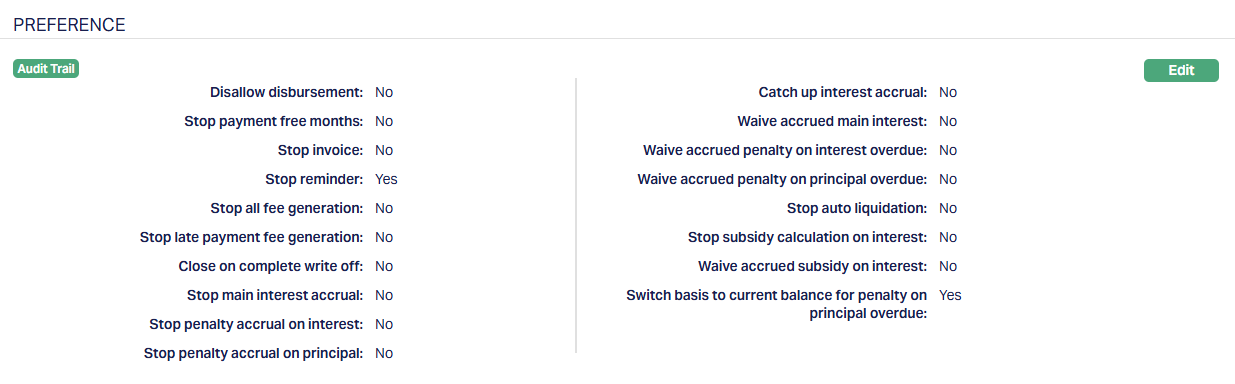
Functions: Edit
Custom Field
This option provides you the flexibility to define fields apart from those that are already available in the standard version of Aura. Thus, it enables you to customize additional data storage and use as required to suit your specific business needs.
Using the Custom Field tab, you can maintain the custom fields mapped to the Loan Status. Depending on the custom fields created and mapped to Loan Status (using Admin → System Codes → Custom Fields), the fields will be displayed on this tab.
To edit Custom Field,
1. Access Loan Status page and click Custom Field tab.

2. Click Edit. Edit Custom Field page appears.

3. Enter Description.
4. Enter Loan Status for the description mentioned.
5. Click Save. Custom Field page appears with the edited details.

Functions: Edit.