
Secure Device
The direct banking channel offering includes Internet banking, Mobile banking applications for Android and iOS. One of the commonly used login methods for a secure login to internet banking is via Secure Device. This Secure Device is an electronic device that generates a special, one time Security Code to protect the customer's account data. The Secure Device maintained here can then be issued to a Channel Banking user.
To Add Secure Device
- From Admin menu, Click Secure stationery and then Secure device. Secure Device Search page appears.

- Click Add. New Secure Device -- General (1/2) page appears.

Enter Device Identifier number. It should be unique.
Click Next. New Secure Device Confirmation (2/2) page appears.
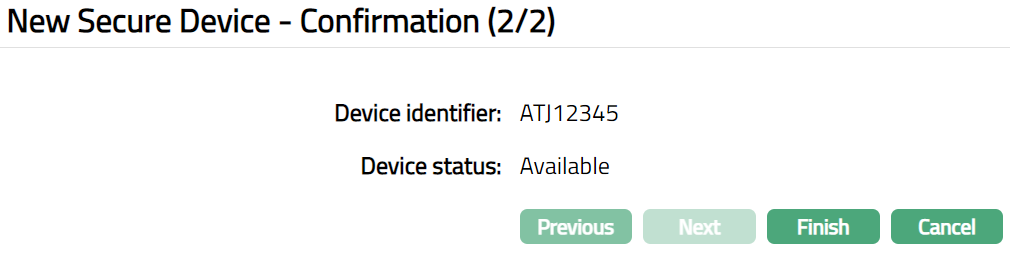
- Click Finish. Secure Device page appears.
 Functions: Add, Edit, Delete, Search
Device status is set to Available as soon as the record is saved. Only if the Device status is Available, it can be issued for use to a Channel Banking user (using Admin > Channel Banking > User Maintenance).
When the Device is marked for issue to a Channel Banking user (using Admin > Channel Banking > User Maintenance), the Device status is updated to Reserved. When the issue of the device is approved, the Device status is updated to Active.
When you want to disable the Device, say at the request of a customer who has lost / misplaced the device, you need to mark it as such using the Edit option.
To Edit Secure Device
- Click Edit. Edit Secure Device page appears.
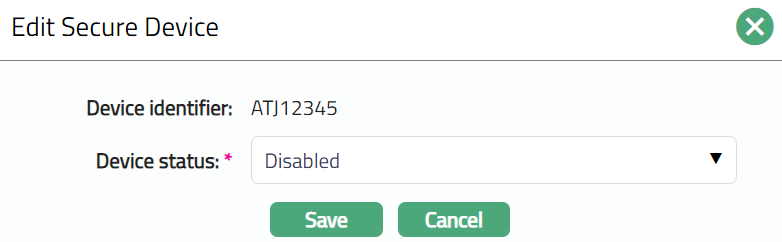
Select Disabled option from the available drop-down list for Device Status.
Click Save. Secure Device page appears showing the Device status as Disabled.

Functions: Edit, Delete