
DocumentationDocumentation
  • Main

    • Introduction
    • My Account

      • Change Password
      • Logout
    • Common Topics

      • Accounting
      • Audit trail and Version control
      • Accounts Vs Contracts
      • Branch Operations
      • Concept of Entity
      • Holidays
      • EOC
      • Concept of Events
      • Concept of Input and Authorization
      • Navigation
      • Impact of Unapproved Records
      • Concept of Product
  • Admin

    • Branches

      • EOC Details
      • Maintain
    • Channel banking

      • Mobile app version
      • Role template
      • Target announcement
      • User maintenance
    • Correspondent Bank Management

      • Maintain
    • Entities

      • Announcement
      • Maintain
      • Task forces
    • Notification

      • Settings

        • Maintain
    • Pricing

      • Charges

        • Charge bundle setting
        • Charge schemes
      • Interest

        • Interest bases
        • Interest rate history
        • Interest scheme
      • Settings

        • Charge bundle group
        • Relationship pricing
    • Reports

      • Audit log
      • Cob exception report
      • User log on - log off
    • Secure stationery

      • Card bundle
      • Card maintenance
      • Secure device
      • Series
      • Welcome kit order
    • Settings

      • Security
    • Status

      • Card account status
      • Client account status
      • Loan status
      • Loan application status
      • Factoring status
    • System codes

      • Address details

        • Address Type
        • E-mail types
        • Phone types
        • Regions
        • Zip codes
        • Zones
      • Categories

        • AML category
        • Block category
        • Category types
        • Conversation category
        • Classified data category
        • Employment categories
        • Loan level risk category
        • Offering
        • Risk category
        • Services delivery channel
        • Tax category
      • Currency

        • Currency
        • Currency rate type
        • Rates authorization
      • Custom fields

        • Custom fields
        • Field mappings
      • Documents

        • Diary types
        • Document type
        • Document templates
      • Generic definitions

        • Clearing zone
        • Community
        • Countries
        • Credit rating agency
        • Identification type
        • Branch levels
        • Departments
        • Education
        • Employment type
        • Identification type
        • Insurance plan
        • Invoice formats
        • Languages
        • Locker type
        • Offer condition
        • Organisation type
        • Person role
        • Purpose of loan
        • Reminder formats
        • Sic codes
        • Statement format
        • Till/vault/ATM
      • Interface definition

        • External Product mapping
        • ISO 8583 mapping
        • Maintain
      • Network calendar

        • Maintain
      • Payments

        • Payment methods
        • Payments terms
        • Source of funds
      • Process

        • Auto allocation rules
        • Branch submenus
        • Business rule parameters
        • Link process
        • Process authorization
        • Process help
        • Process mapping
        • Process reasons
        • Stage rule association
    • Tax schemes

      • Maintain
    • Translations

      • Aura-data
      • Aura-label
    • Users

      • Authentication settings
      • Active sessions
      • Designations
      • Maintain
      • Roles
      • Role groups
      • Unapproved records
    • Additional Topics

      • Interest Accrual
  • Retail

    • Accounts

      • Client account

        • Closure
        • Maintain
      • Multi-currency contract

        • Maintain
      • Nostro account

        • Closure
        • Maintain
      • Operations

        • Adhoc Charges
        • Cheque number search
        • Prepaid instrument issue enquiry
      • Term deposit

        • Maintain
        • Premature withdrawal
        • Reversal
    • Loans

      • Change of terms

        • Interest Parameters
        • Payment Terms
        • Settings
        • Invoice Cancellation
      • Charge waiver
      • Disbursement
      • Maintain
      • Product Novation
      • Repayment

        • Full Prepayment
        • Partial Prepayment
        • Payment of Due Amounts
        • Payment of Invoice Amounts
        • Simulation of Payment
      • Restructuring
      • Reversal
      • Loan application

        • Maintain
    • Loan Broker

      • Maintain
    • Payments

      • Gross payment settlement

        • RTGS/SWIFT/TARGET2
      • Net payment settlement

        • Authorization
        • Enquiry
        • Credit transfer
        • Dispatch accounting enquiry
        • Debit order
        • Internal client transfer
      • Standing instructions

        • Maintain
    • Peer-to-peer

      • Loan request

        • Maintain
        • Loan request repayment
      • Placement instruction

        • Maintain
      • Placement plan

        • Maintain
      • Settings

        • Loan request settings
        • Marketplace preferences
        • Placement settings
        • Product
    • Safe deposit locker

      • Agreement
      • Maintain
      • Operation
    • Settings

      • Collection settings
      • Multi-currency settings
      • Payment settings
      • Payment template
      • Product Maintenance
      • Product-Client Account
      • Product-Term Deposit
      • Product-Nostro Account
      • Product-Mortgage and Loan
      • Standing instruction settings
      • Transaction defaults
    • Transaction review

      • Account statement
    • Transaction wizard

      • Cash deposit
      • Cash withdrawal
    • Additional Topics

      • Module Specific EOC Batches
      • Payment Processing
  • Commercial

    • Factoring

      • Contract

        • Maintain
        • Disbursement
        • Repayment
        • Change of terms
      • Operations

        • Adhoc charges
      • Settings

        • Product
  • Treasury

    • Forex

      • Contracts

        • Cancellation
        • Maintain
        • Manual Settlement
      • Settings

        • Product
    • Additional Topics

      • Module Specific EOC Batches
  • Card

    • Cards

      • Maintain card
      • Maintain card account
      • Maintain dispute account
    • Loans

      • Change of terms
      • Disbursement
      • Maintain
      • Repayment
      • Reversal
    • Operations

      • Balance Movement
      • Change of Cycle
      • Manual actions
    • Settings

      • Card account product
      • Card loan product
      • Card product
      • Card provider
      • Merchant category
      • Charge group
      • Cycle group
      • Interest group
      • Message type
    • Transaction review

      • Transaction enquiry
    • Additional Topics

      • Balance classification
      • Overdue Days
      • Interest Liquidation
      • Replenishment
      • Module Specific EOC Batches
      • Reversals
  • CRM

    • Clients

      • Agreement
      • Maintain
      • Marketplace investment preferences
    • Collateral/Limits

      • Collaterals
      • Limits
      • Settings

        • Limit setting
    • Conversations

      • Conversation
    • Due diligence

      • Organization
      • Person
    • Loyalty program

      • Maintain
      • Reward points redemption
      • Settings

        • Product
        • Reward group
    • Organisation

      • Maintain
    • Person

      • Maintain
    • Reports

      • Balance certificate
      • Average account balance
    • Sales

      • Agent
      • Agent User
      • Campaigns
      • Outlet
      • Performance targets
      • Terminal
    • Additional Topics

      • Limit Utilization
      • Module Specific EOC Batches
  • General ledger

    • Collective impairment

      • Maintain
    • General ledger

      • Accounts
      • Chart of accounts
    • Reports

      • Branch Inter-branch reconciliation
      • GL report
      • GL transaction report
      • Inter branch - Due to Due from
      • Journal report
    • Settings

      • Accounting period
      • Currency
      • Journal template
      • Transaction code
      • Related transaction setting
    • Transaction entry

      • Cross currency journal
      • Day journal
      • Station journal
    • Transaction review

      • Statement
      • Transaction enquiry
    • Additional Topics

      • Module Specific EOC Batches
  • Digital assets

    • Escrow covenant
    • Primary issue
  • Paymentgrid

    • Settings

      • Charge rule
      • General ledger
      • Language converter
      • Message configuration
      • Network cutoff time
      • Nostro BIC mapping
      • Nostro route
      • Nostro configuration
      • Product
      • STP configuration
      • Transaction code
    • Operations

      • Bulk dispatch for inward cheques
      • Debit order
      • Direct Debit
      • Free format message
      • Gross settlement
      • Net settlement
      • STP exception
    • Nostro reconciliation

      • Account mapping and preferences
      • External manual entry
      • External statement view
      • Manual reconciliation
      • Reconciliation details
      • Reports

        • Adjustment entry report
        • Reconciled entry report
        • Reversed entry report
        • Unreconciled entry report

Card Maintenance

The Card maintenance menu allows you to manage the issue and status updates for Cards for use by Channel (Internet / Mobile) banking users. Once the code cards of a card bundle are printed, the status of the cards is updated to Printed and Approved. Only such cards can be further issued to Channel banking users.

Edit Card Maintenance

A Card can be issued to a Channel banking users by updating the Card status from Printed to Issued. Similarly, an Issued card can be Blocked, when reported as lost / misplaced by the Channel banking user, or as needed.

To issue a card,

1. From the Admin menu, click Secure Stationery and then Card maintenance. The Card Maintenance Search page appears.

2. Retrieve the card records by an appropriate search. A sample of the screen is shown below.
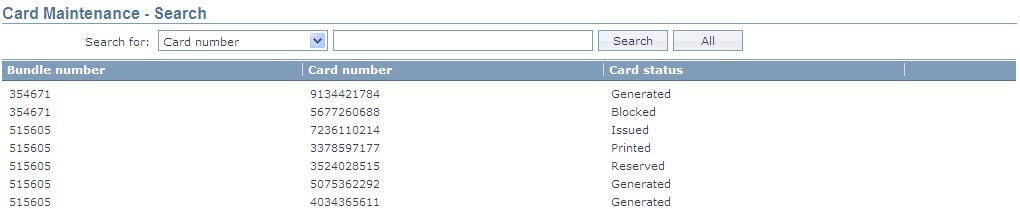
3. Click on the required card record that you want to issue to the Channel banking user. You will see the details of the card as shown below.
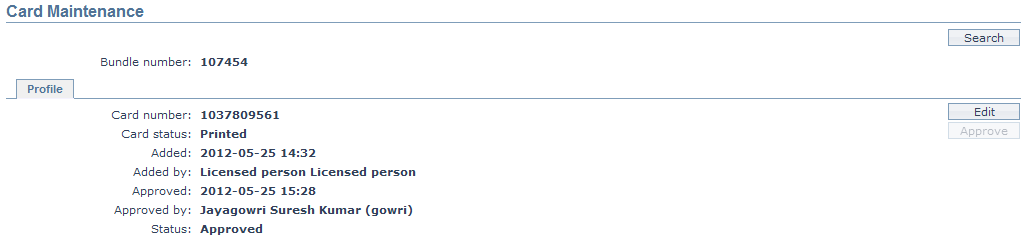
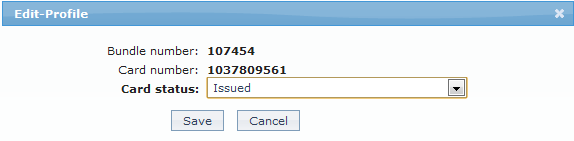
4. Click Edit. The Edit-Profile window appears.
Card Maintenance -
Edit

5. Select the Card status from the drop down list. To issue the card, choose Issued.

6. Click Save to save the details that you entered. The Card status is updated to Issued and the record status to Pending.

The issue has to be approved by another user.

Note:

  • Edit button is enabled for the user who made the last update, till it is approved by another user.

  • Approve button is enabled only for the user other than the one who last updated

Once approved, edit button is enabled for all users.

To approve

1. Access the Card Maintenance page of the required card

2. Click on Approve. Aura will prompt you to confirm approval

Card Isse Approve - confirmation
message

3. Click on Yes. The Card status is issued and the record status is approved. The details of approval are displayed as shown below.
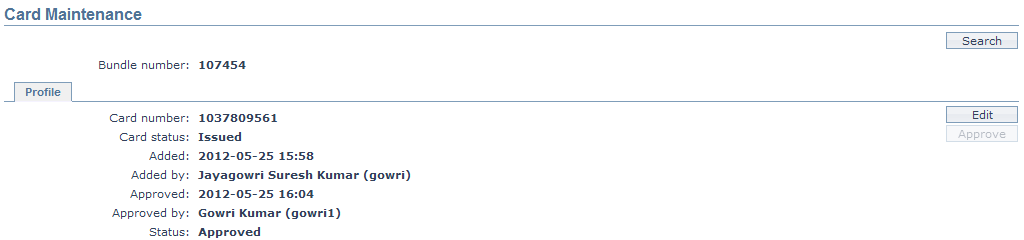
Card Maintenance - Approval
confirmedFunction: Edit, Search.

When any card status is approved, Edit button is enabled for further status updates, as required. The steps would be the same as described for Issue of card and approval.

The following are the various possible values for Card Status:

  • Printed: The card has just been printed and not yet issued
  • Reserved: The card has been marked for issue to a channel banking user, but the issue has not yet been approved
  • Issued: The card has been issued to a channel banking user and approved
  • Blocked: The card has been marked as blocked to prevent any further transactions

Card Status can be changed only as per the following conditions:

Current Card StatusPossible status updates
PrintedReserved, Issued or Blocked
ReservedIssued or Blocked
IssuedBlocked or Reserved
Prev
Card bundle
Next
Secure device