
Copy from Existing
The Copy from Existing option allows a new product to be created by copying configuration from an existing active product of the same product type.
When Copy from Existing is selected, the Copy from field is displayed. Select an active Product from the list to use as the source product.
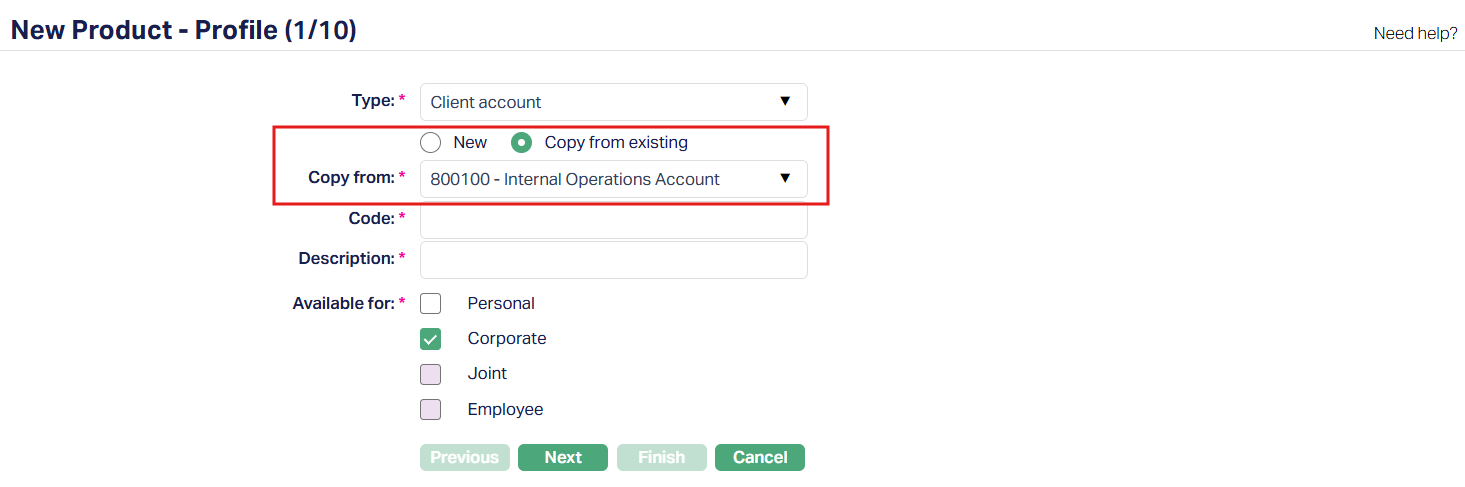
The information carried over through Copy from Existing may differ depending on the product type. The following sections describe the items displayed in the Add Wizard and the tabs updated after the new product is created.
Client Account Product:
Add Wizard
When an existing Client Account Product is selected in the Copy from field, the following items are carried over and displayed in the Add Wizard:
| Add Wizard Step | Items Carried Over |
|---|---|
| Profile 1/10 | Available For |
| Currency 2/10 | All; In Currency, the later-added currency was populated in the Add Wizard. |
| Settings 3/10 | All |
| Interest Payable 4/10 | All |
| Interest Receivable 5/10 | All |
| Charges 6/10 | All |
| General Ledger 7/10 | All |
| Transaction Settings 8/10 | All |
| Statement Parameter 9/10 | All |
| Custom Field 10/10 | All |
The Code and Description of the New Product are entered for the New Product rather than copied from the existing Product since they have to be unique.
After reviewing the information in the Add Wizard, proceed through the wizard and select Finish on the Confirmation page to create the product.
Product Tabs
After the new Client Account Product is created, compare the configuration with the source product. The following tabs and configurations are updated:
| Tab | Configuration | Result |
|---|---|---|
| PROFILE | Profile - Available For | Copied |
| Currency | Copied | |
| Settings | Copied | |
| Withdrawal Conditions | Copied - Pending Status | |
| Availability | Copied | |
| Statement Parameter | Copied - Pending Status | |
| Document Template Settings | Copied | |
| PRICING | Interest Payable | Copied - Pending Status |
| Interest Receivable | Copied - Pending Status | |
| Charge | Copied - Pending Status | |
| Additional Charge | Copied - Pending Status | |
| Sales | Copied | |
| REPAYMENT | Impairment - Setting | Not Copied |
| Impairment - Sequence | Not Copied | |
| STATUS RULE | Rules | Copied - Pending Status |
| Rule Sequence | Copied | |
| ACCOUNTING | General Ledger | Copied |
| Transaction Settings | Copied | |
| CUSTOM FIELD | Custom Field | Copied |
The Comparison identified that Impairment - Setting and Impairment - Sequence are NOT copied to the new Product, while several other configurations are copied in Pending status.
Mortgage and Loan Product:
Add Wizard
When an existing Mortgage and Loan Product is selected in the Copy from field, the following items are carried over and displayed in the Add Wizard:
| Add Wizard Step | Items Carried Over |
|---|---|
| Profile 1/10 | Available For |
| Currency 2/10 | All; In Currency, the later-added currency was populated in the Add Wizard. |
| Settings 3/10 | Include disbursement charges in loan amount; and Net receivables during disbursement field had to be reselected. |
| Interest Receivable 4/10 | All |
| Charges 5/10 | All |
| General Ledger 6/10 | All |
| Transaction Settings 7/10 | Capitalization of interest on curing (DB/Client) had to be reselected. |
| Statement Parameter 8/10 | All |
| Custom Field 9/10 | All |
The Code and Description of the New Product are entered for the New Product rather than copied from the existing Product since they have to be unique.
Note: In Currency, the later-added currency was populated in the Add Wizard.
After reviewing the information in the Add Wizard, proceed through the wizard and select Finish on the Confirmation page to create the product.
Product Tabs
After the new Mortgage and Loan Product is created, compare the configuration with the source product. The following tabs and configurations are updated:
| Tab | Configuration | Result |
|---|---|---|
| PROFILE | Profile - Available For | Copied |
| Currency | Copied; Currency order differs | |
| Currency - Threshold | Displays only for Later added Currency. | |
| Settings | Copied | |
| Availability | Copied | |
| Statement Parameter | Copied - Pending Status | |
| Document Template Settings | Copied | |
| Insurance Plan | Copied - Active | |
| Reward Group | Not Copied | |
| PRICING | Interest Receivable | Copied - Pending Status |
| Special Interest Scheme | Not Copied; defaults to No - Pending Status | |
| Subsidy | Copied - Pending Status | |
| Offering | Copied | |
| Charge | Copied - Pending Status | |
| Additional Charge | Copied - Pending Status | |
| Sales | Copied | |
| REPAYMENT | Invoice Settings | Copied |
| Invoice Settings - Secondary Collection | Copied | |
| Reminder Preferences – Preferences | Copied | |
| Reminder Preferences – Threshold | Not copied | |
| Status Rule - Rules | Copied - Pending Status | |
| Status Rule - Rule Sequence | Copied | |
| Repayment Order | Copied | |
| Impairment | Copied - Pending Status | |
| ACCOUNTING | General Ledger | Copied |
| Transaction Settings | Copied | |
| CUSTOM FIELD | Custom Field | Copied |
The Comparison identified that Reward Group, Special Interest Scheme and Reminder Preferences - Threshold are NOT copied to the new Product, while several other configurations are copied in Pending status.
Term Deposit Product:
Add Wizard
When an existing Term Deposit Product is selected in the Copy from field, the following items are carried over and displayed in the Add Wizard:
| Add Wizard Step | Items Carried Over |
|---|---|
| Profile 1/8 | Available For |
| Currency 2/8 | All; In Currency, the later-added currency was populated in the Add Wizard. |
| Settings 3/8 | All |
| Interest Payable 4/8 | All |
| General Ledger 5/8 | All |
| Transaction Settings 6/8 | All |
| Statement Parameter 7/8 | All |
| Custom Field 7/8 | All |
The Code and Description of the New Product are entered for the New Product rather than copied from the existing Product since they have to be unique.
Note: In Currency, the later-added currency was populated in the Add Wizard.
After reviewing the information in the Add Wizard, proceed through the wizard and select Finish on the Confirmation page to create the product.
Product Tabs
After the new Term Deposit Product is created, compare the configuration with the source product. The following tabs and configurations are updated:
| Tab | Configuration | Result |
|---|---|---|
| PROFILE | Profile - Available For | Copied |
| Currency | Copied; Currency order differs | |
| Settings | Copied | |
| Availability | Copied | |
| Statement Parameter | Copied - Pending Status | |
| Document Template Settings | Copied | |
| Restrictions | Not Copied | |
| Reward Group | Not Copied | |
| PRICING | Interest Payable | Copied - Pending Status |
| Term Bands | Copied - Pending Status | |
| Sales | Copied | |
| Premature Withdrawal | Copied - Pending Status | |
| REPAYMENT | Reminder Preferences | Copied |
| ACCOUNTING | General Ledger | Copied |
| Transaction Settings | Copied | |
| CUSTOM FIELD | Custom Field | Copied |
The Comparison identified that Restrictions and Reward Groups are NOT copied to the new Product, while several other configurations are copied in Pending status.
Nostro Account Product:
Add Wizard
When an existing Nostro Account Product is selected in the Copy from field, the following items are carried over and displayed in the Add Wizard:
| Add Wizard Step | Items Carried Over |
|---|---|
| Profile 1/7 | Available For |
| Currency 2/7 | All; In Currency, the later-added currency was populated in the Add Wizard. |
| Settings 3/7 | All |
| General Ledger 4/7 | All |
| Transaction Settings 5/7 | All |
| Statement Parameter 6/7 | All |
| Custom Field 7/7 | All |
The Code and Description of the New Product are entered for the New Product rather than copied from the existing Product since they have to be unique.
Note: In Currency, the later-added currency was populated in the Add Wizard.
After reviewing the information in the Add Wizard, proceed through the wizard and select Finish on the Confirmation page to create the product.
Product Tabs
After the new Nostro Account Product is created, compare the configuration with the source product. The following tabs and configurations are updated:
| Tab | Configuration | Result |
|---|---|---|
| PROFILE | Profile - Available For | Copied |
| Currency | Copied; Currency order differs | |
| Settings | Copied | |
| Availability | Copied | |
| Statement Parameter | Copied - Pending Status | |
| Document Template Settings | Copied | |
| ACCOUNTING | General Ledger | Copied |
| Transaction Settings | Copied | |
| CUSTOM FIELD | Custom Field | Copied |