
Enquiry
Enquiry allows you to view all the payment and collection record of type Incoming, Outgoing, Own account transfer, Other client transfer, Inward, Outward, Outward return, Inward return transactions.
For instance, the outgoing transactions will be initiated from Aura. After initiation, the payment record comes to Enquiry where we can approve the record and view the transaction based on search values.
Whereas, incoming transactions will be received by DataMatrice (DM), then goes to PaymentGrid (PG) and then comes to Aura for accounting entries and updation.
Viewing Payment record,
1. From Retail menu, click Net Settlement, and then Enquiry.
2. Enquiry appears. Initially, transaction records will not be displayed.

3. To search for a transaction, do one of the following actions:
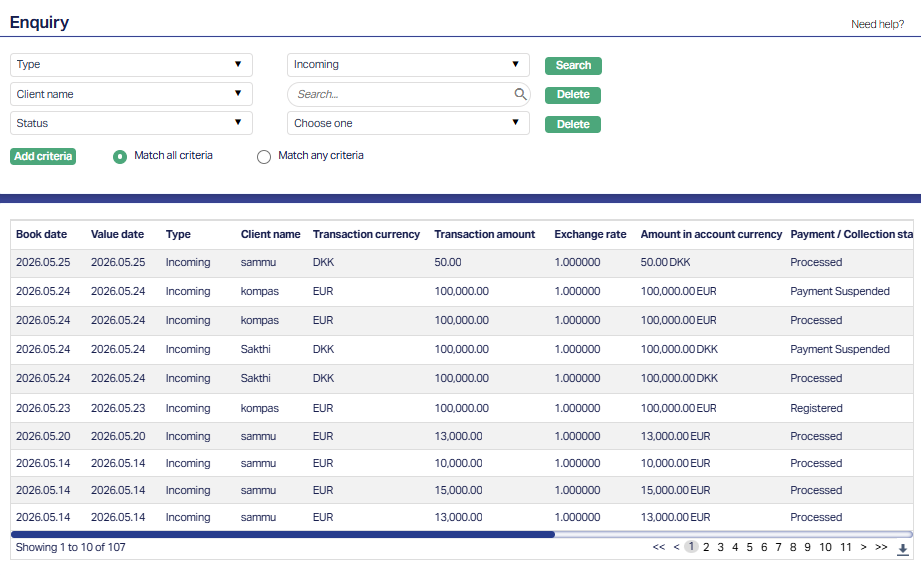
- Enter an appropriate search input in the textbox provided next to the Search for dropdown, which allows a search by Book Date, Value Date, Type, Client name, Transaction currency, Transaction amount, Exchange rate, Amount in account currency, Payment / Collection reference #, Payment / Collection status, Status, Credit Account, Debit Account, Beneficiary Account, Clearing Network For example, select Client name from the Search for drop-down and enter the Client name in the search text box. Click Search. All transactions available in Aura which satisfy the search criteria will appear on the page, as shown below:
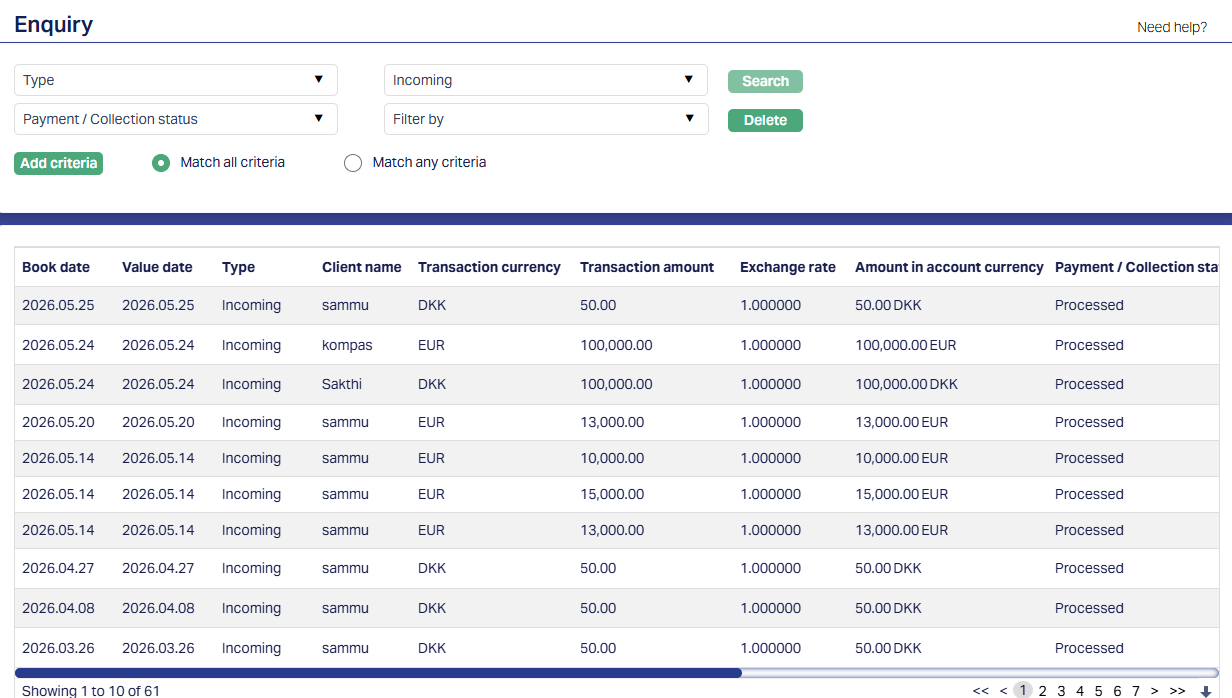
Book date: It displays the date on which the transaction is booked.
Value date: It displays the date on which the transaction value is effective.
Type: It displays the type of Payment or Collection transaction. The available types are: Incoming, Outgoing, Own account transfer, Other client transfer, Inward, Outward, Outward return and Inward return
Client name: It displays the name of the client associated with the transaction.
Transaction currency: It displays the currency in which the transaction is processed.
Transaction amount: It displays the amount of the transaction in the transaction currency.
Exchange rate: It displays the exchange rate applied to the transaction.
Amount in account currency: It displays the transaction amount converted into the account currency.
Payment / Collection reference #: It displays the unique reference number assigned to the Payment or Collection transaction.
Payment / Collection status: It displays the processing status of the Payment or Collection transaction.
The status can be: Failed, Booked, Processed, Reserved, Cancelled, Rejected, Registered, Reversed, Sent for Collection, Returned, Paid, Issued, Pending, Accepted, AML Completed, Accounting Completed, AML Remediated, AML Under Review, Accounting suspended, AML Failed, Accounting Failed, Outpay Failed, Annulled, AML Rejected, Payment Suspended and Payment Failed
| Payment / Collection Status | Description |
|---|---|
| Failed | Indicates that the payment or collection transaction could not be completed due to a processing failure. Occurs when an unhandled system exception or runtime processing error prevents the transaction from completing successfully. |
| Booked | Indicates that the transaction has been successfully booked to the ledger. Occurs when the required debit and credit accounting entries for the transaction have been executed on the customer account or internal ledger. |
| Processed | Indicates that the payment or collection transaction has completed its end-to-end processing successfully. Occurs after all required validation, booking, clearing dispatch, and settlement reconciliations for the transaction have finished. |
| Reserved | Indicates that the transaction amount has been reserved on the debtor's account. Occurs when funds are placed on hold/earmarked to ensure sufficient balance before final ledger debit or settlement execution takes place. |
| Cancelled | Indicates that the payment or collection transaction has been cancelled. Occurs when a user manually cancels a pending transaction before execution or when an automated system rule withdraws the instruction prior to cut-off. |
| Rejected | Indicates that an outgoing payment was rejected by the clearing partner (Banking Circle) after initial acceptance, or that a failed payment was formally rejected by a user. For outgoing transfers via Banking Circle: Since internal validation succeeds initially, Aura first debits the ordering customer’s account and credits the Nostro account, marking the payment as Accepted. If Banking Circle later fails to execute the payment and returns an outgoing payment rejected webhook notification, Aura executes an automated financial reversal using negative amounts (Storno entry) reversing the debit to the customer account and the credit to the Nostro account and marks the transaction as Rejected. |
| Registered | Indicates that the payment or collection instruction has been captured and registered in Aura. Occurs when the transaction is created and assigned a unique payment reference ID, awaiting subsequent validation, authorization, or posting. |
| Reversed | Indicates that a previously booked or processed transaction has been financially reversed. Occurs when an operator manually initiates a reversal or when an automated system reversal event executes, rolling back the original debit and credit entries.. |
| Sent for Collection | Indicates that the collection instruction has been dispatched for clearing collection. Occurs when collection instructions are batched into clearing files (e.g., Direct Debit, Autogiro, or Betalingsservice) and submitted to the clearing network or debtor's bank. |
| Returned | Indicates that a dispatched collection or outgoing payment was returned unpaid by the debtor's bank or clearing network. Occurs when an incoming return file or message is received (e.g., due to insufficient funds, closed account, mandate revocation, or debtor dispute). |
| Paid | Indicates that the payment or collection amount has been settled and paid. Occurs when incoming funds are received, confirmed, and applied to settle the underlying invoice, loan due amount, or account obligation. |
| Issued | Indicates that an official payment instruction, advice, or instrument has been generated and released. Occurs when the transaction file or payment message is generated and issued into the outbound clearing channel. |
| Pending | Indicates that the payment or collection transaction is awaiting further processing or action. Occurs when the transaction cannot proceed until a prerequisite is satisfied, such as four-eyes (maker-checker) authorization or the arrival of a future value date. |
| Accepted | Indicates that the payment or collection transaction has been validated and accepted. Occurs when the transaction successfully passes initial system validation or receives an external positive acceptance acknowledgement from the clearing network or counterparty bank. |
| AML Completed | Indicates that the Anti-Money Laundering (AML) and sanctions screening process has been completed successfully. Occurs when the transaction is screened against watchlists and rules without detecting any matches or compliance blocks. |
| Accounting Completed | Indicates that all financial and general ledger postings for the transaction have been completed. Occurs when double-entry accounting entries are successfully generated and balanced across the customer and general ledger accounts. |
| AML Remediated | Indicates that an AML or sanctions alert flagged for the transaction has been resolved. Occurs when a compliance officer investigates a flagged alert, determines it to be a false positive or cleared item, and approves the transaction to proceed. |
| AML Under Review | Indicates that the transaction is currently held for compliance inspection. Occurs when automated AML screening detects a potential watchlist hit, PEP match, or high-risk rule trigger that requires manual review before funds can move. |
| Accounting Suspended | Indicates that accounting ledger posting for the transaction is temporarily suspended. Occurs when posting is placed on hold pending batch processing, end-of-day cut-off windows, or an effective future booking date. |
| AML Failed | Indicates that the AML screening check could not be completed due to a technical failure. Occurs when Aura experiences a communication error, timeout, or service unavailability while attempting to connect to the AML screening engine. |
| Accounting Failed | Indicates that ledger posting for the transaction could not be completed. Occurs when the accounting engine encounters an error during posting, such as missing GL account mappings, debit-credit imbalance, or locked ledger accounts. |
| Outpay Failed | Indicates that the dispatch of an outgoing payment to the external clearing network or partner bank has failed. Occurs when file generation, encryption, network connectivity, API dispatch, or SFTP transmission fails during outbound processing. |
| Annulled | Indicates that the payment or collection transaction has been declared void and nullified. Occurs when an authorized administrator formally annuls an erroneous or duplicate transaction before it takes financial or legal effect. |
| AML Rejected | Indicates that the transaction has been rejected on compliance grounds. Occurs when a compliance officer or automated screening rule confirms a true sanctions match, prohibited entity hit, or severe AML violation, permanently hating the payment. |
| Payment Suspended | Indicates that an incoming payment cannot be credited to the beneficiary due to a business exception (e.g., the beneficiary customer’s account is dormant, blocked, or restricted). To prevent halting the clearing money flow, Aura debits the Nostro account and parks the funds by crediting the internal Repair Ledger. Once the underlying business exception or account dormancy is resolved, an operator can retry the payment. Upon a successful retry, Aura debits the Repair Ledger, credits the beneficiary client account, and updates the payment status to Processed. |
| Payment Failed | Indicates that a payment could not be processed due to a technical failure (e.g., communication timeout, message parsing error, service unavailability, or processing failure). This status can occur for both incoming and outgoing payments. A transaction in Payment Failed status can be manually reviewed and rejected by an authorized user, which transitions the payment status to Rejected. |
Status: It displays the approval status of the transaction record. The available statuses are Approved and Pending.
Credit Account: It displays the account that is credited as part of the transaction.
Debit Account: It displays the account that is debited as part of the transaction.
Beneficiary Account: It displays the beneficiary account associated with the transaction.
Clearing Network: It displays the clearing network used to process the transaction. The current clearing networks available are: DCL-Bank Account, Bankgito, NICS, SEPA-INST, GIRO and SEPA