Limit Utilization
Utilization
Single Limit attached to an account
Shared Limit -- for two Billing accounts; for Billing and Transaction Account, Card Account and Card Loan account
Limit Hierarchy -- Allocated Limit for two billing accounts ; Billing and Transaction Account
Impact of Earmark (Creation, Suspension and Expiry)
Impact of Amount Block (Creation, Expiry)
Impact of overdraft expiry
Impact of Utilization beyond Limit
Limits and Limit Hierarchies
The Limit maintenance option available in CRM can be used to set limits for a particular person or corporate client. Multi-level limits can be achieved by using the limit hierarchy wherein the corporate can have an overall limit and the individual departments can have sub limits. This can also be used to create family hierarchies for personal clients.
User can maintain different limits and attach different card accounts to different limits with one overall limit.
For example:
Corporate ABC -- can have one overall limit of EUR 1,000,000
Department X -- can have one limit of EUR 600,000
Department Y -- can have one limit of EUR 300,000
Department Z -- can have one limit of EUR 300,000
Aura will ensure that the overall exposure or sum of all limits at the corporate level will not be more than 1,000,000 EUR and for each department will be within the limit set for that department
The user can maintain as many limits as needed in as many hierarchies and attach accounts to such Limits.
When the card account is created the same can be attached to a limit with a sum contributed to that account. So assuming a card account is created for person in department X and this card account is to be given a limit of 100,000 then a sum of 100,000 is allocated to this account during linkage of limit to the account and hence the account will get a limit of 100,000 subject to the department exposure being within 600,000 and subject to the overall corporate exposure being within 1,000,000. This can also be achieved by creating a sub-limit of 100,000 within the overall limit and attaching the sub-limit to the account for 100,000.
Department X can have many accounts linked below and so can other departments too. Bank can create as many structures for each client (corporate) and department (also to be maintained as client) and manage parent / child limit hierarchies.
Shared and Allocated Limits
Shared Limit
Both shared credit limit and allocated credit limit can be handled by just setting the amounts at account level.
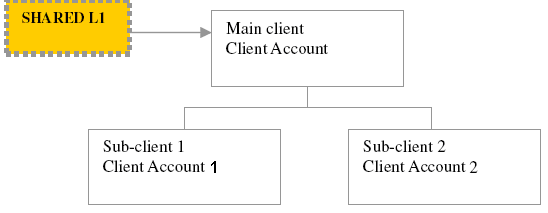
To handle Shared credit limit as described in figure above the user has to attach the same Limit L1 and put in the same limit amount in both accounts. So if the limit amount is 50,000 EUR, the user can put in 50,000 EUR in both accounts. Therefore each account can go up to 50,000 EUR subject to the overall exposure being 50,000 EUR.
Allocated Limit
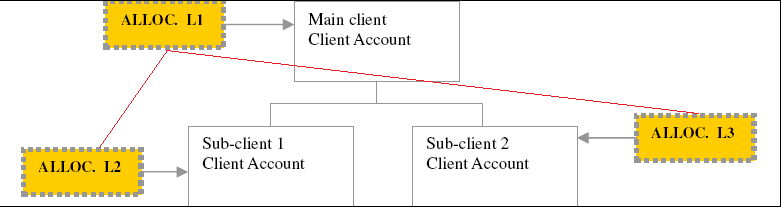
To handle allocated credit limit as described in figure above, the user use has to create separate limits and attach them to each account by putting in the Allocated limit amounts by account.
So if L1 = 50,000 EUR; and its child limits are L2 = 20,000 EUR and L3 = 30,000 EUR
The user allocates 20,000 EUR for Sub-Client 1 card account and 30,000 EUR for Sub-Client
2 card account.
Aura will ensure that Sub-Client 1 card account cannot go more than 20,000 EUR and Sub-Client 2 account cannot go more than 30,000 EUR subject to the overall 50,000 EUR limit exposure.
Billing account and Transaction account
Billing account determines the account from which interest is debited from. It is also the account into which customers will make their payments.
An account can have only one billing account, whereas one account can be the billing account for more than one transaction account. The billing account itself may or may not be a transaction account.
Earmark
Earmark feature will ensure that any amounts that have to be made available only to a certain transaction account can be earmarked by billing account or set-aside for that transaction account. The user can earmark funds for this account subject to the availability of funds at the parent limit for a period of time and then the earmark will expire when this earmarked period is complete.
Billing account can earmark amount only to associated transaction accounts.
Example: -
Billing Account B has Transaction Account T and Another Billing Account C has Transaction Account D. Then B can earmark amount only to T and not to D.
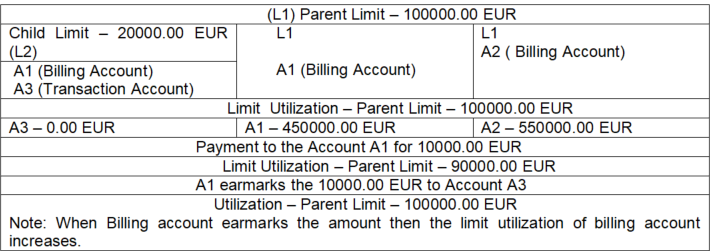
The earmark will ensure that the parent limit gets reduced or "earmarked" to the extent and therefore the accounts that are linked to the parent limit on a shared limit basis cannot use this amounts.
Example:
Limit threshold
The limit threshold ensures that over limit charges and interest are not marked if the limit is breached by an amount set within the threshold. It can be set in two ways:
Limit threshold % - % will be calculated on the Limit amount.
Limit threshold amount -- An amount in terms of the account currency
If both % and amount are entered, system will consider the lesser of the two as the actual threshold.
For Example
If the limit threshold is maintained as 1000 EUR, then the system will charge over limit charge only if the account balance goes beyond the (limit + limit threshold).
Authorization Buffer
Authorization threshold insures that transaction authorization is allowed up to amount set within threshold though account does not have available balance.
Authorization buffer % - % will be calculated on the Limit amount.
Buffer amount ceiling -- An amount in terms of the account currency
If both % and amount are entered, system will consider the lesser of the two as the actual threshold.
For Example
If the Authorization threshold is maintained as 1000 EUR, then the system will allow authorizing transaction only if the account balance goes beyond the (available balance + Authorization threshold).
Revolving and Non Revolving Limits
Revolving -- Revolving limits will constantly get updated as and when payments are made to the account attached to the limit.
Non Revolving -- Non revolving limits will not get updated as when payments are made to the account attached to the limit -- and hence, once the limit amount is completely utilized, there is no further availability.
For the cards set up bank will use Revolving Limit type in Aura.
Example -- Revolving and Non-revolving
Date -- 20-Jan-2013
Given Limit -- 100000 EUR,
On 25 Jan If there is a debit of 50000 EUR on the account
Available Limit -- 50000 EUR
On 29 Feb Payment is made for 25000 EUR
Revolving limit type: Available limit gets updated to 75000 EUR
Non-revolving limit type: Available limit remains as 50000 EUR
This scenario explains impact of Current dated debit, future dated debit, credit transactions on the limit utilization.
Limit with below details have been created.
Limit -- L1
Total Limit amount -- 100000.00 EUR
The above Limit has been attached to the account.
Below mentioned table explains different transaction activities and their respective impact on Limit Utilization.
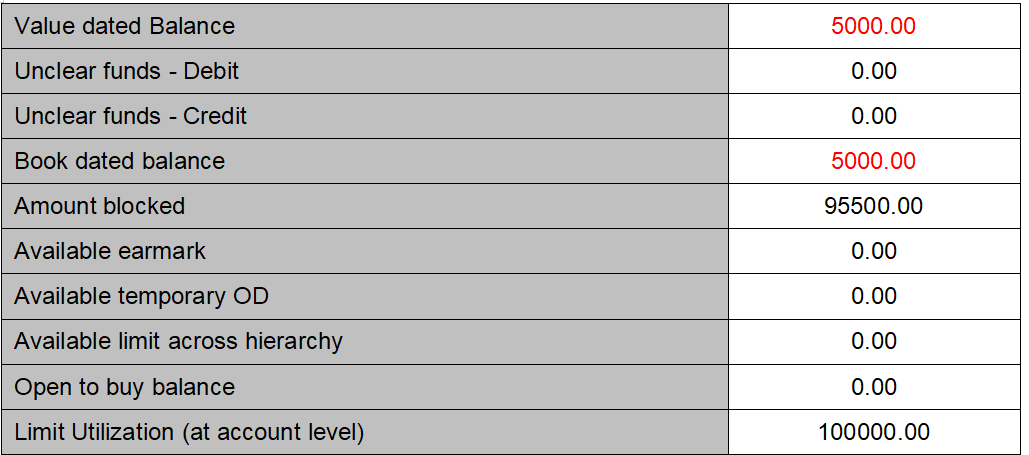
All values are in EUR. Amount mentioned in RED color indicated the debit balance.
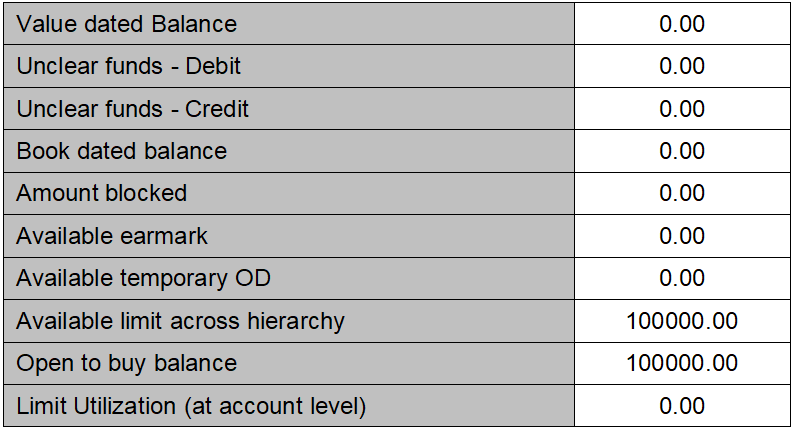
Debit current value dated transaction into the account for 5000.00 EUR. The impact is,
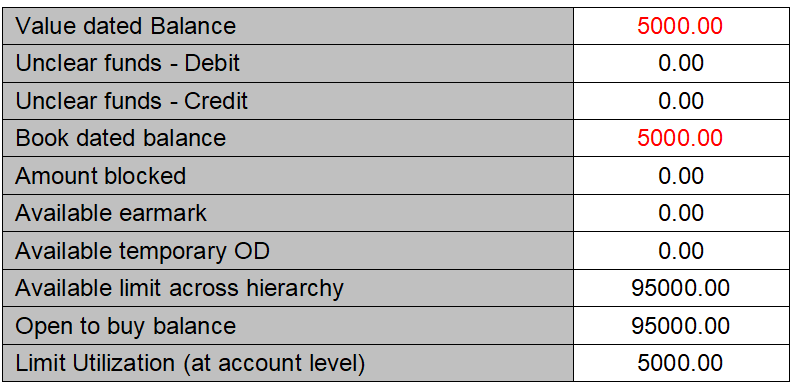
Credit current value dated transaction into the account for 3000.00 EUR. The impact is,
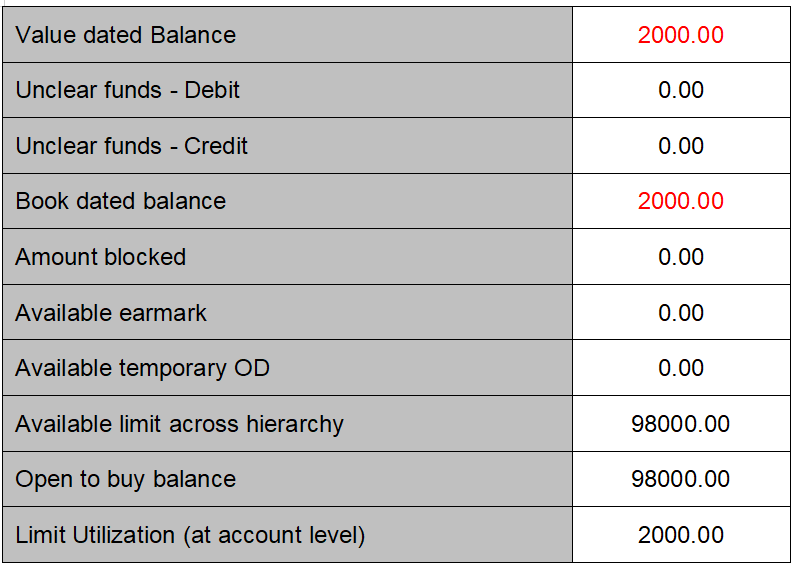
Debit future value dated transaction into the account for 2500.00 EUR. The limit utilization is book dated so future value dated transactions do impact on the limit utilization. The impact is,
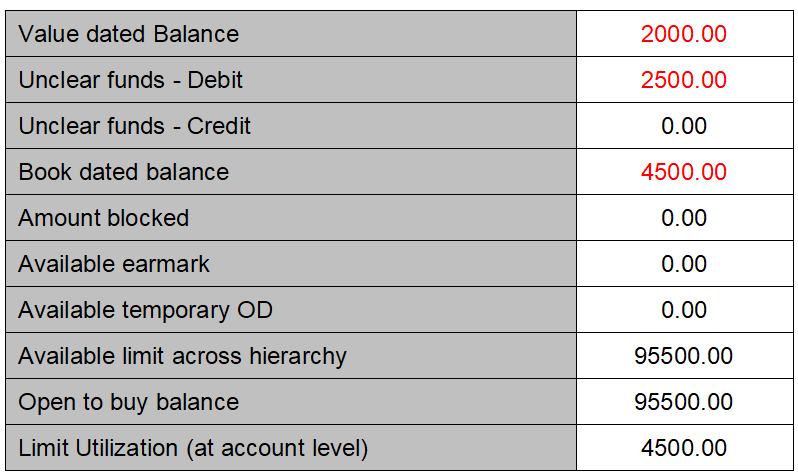
This scenario explains impact of Current dated debit, future dated debit, credit transactions on the limit utilization for shared limit.
Account and Limits with below details have been created.
Account # - A1
Limit ID -- L1
Total Limit amount -- 100000.00 EUR
Available Limit amount -- 100000.00 EUR
Account # -A2
Limit ID -- L1
Total Limit amount -- 100000.00 EUR
Available Limit amount -- 100000.00 EUR
Below mentioned table explains different transaction activities and their respective impact on Limit Utilization.
All values are in EUR. Amount mentioned in RED color indicated the debit balance.
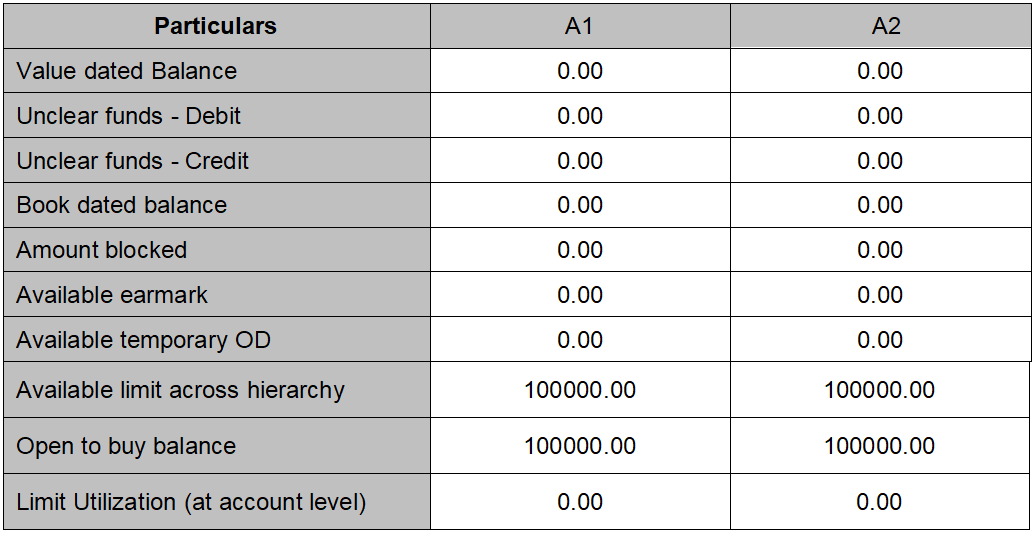
Account opening fee has being debited from both accounts, the impact is
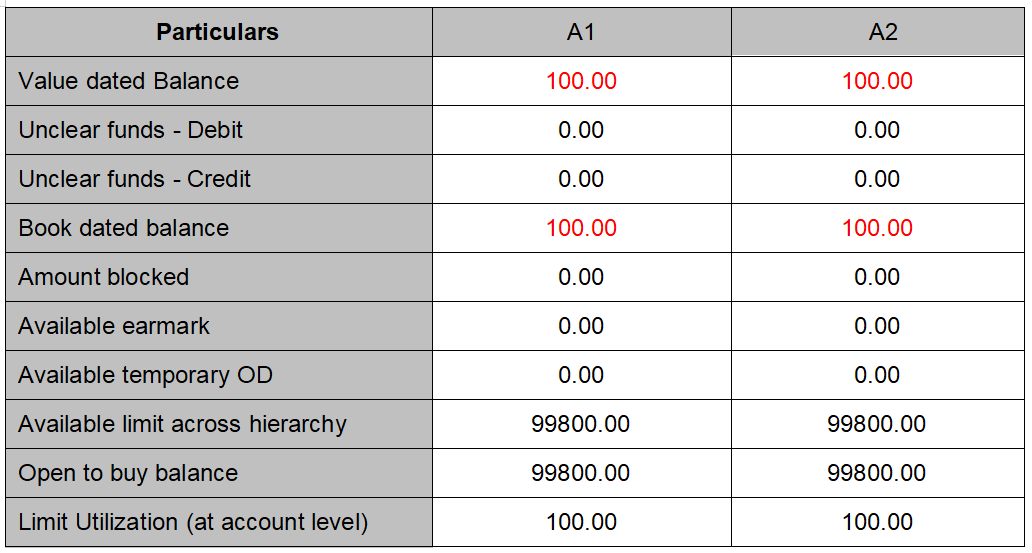
Debit current value transaction for 3000.00 from Account 1 and no transactions to account 2, the impact is
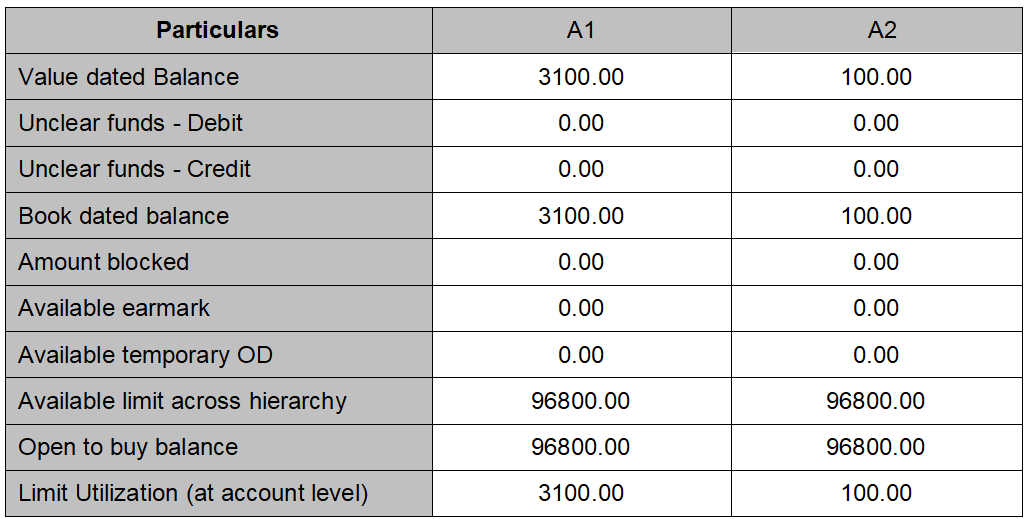
Debit future value transaction for 2500.00 from Account 1 and no transactions to account 2, the impact is
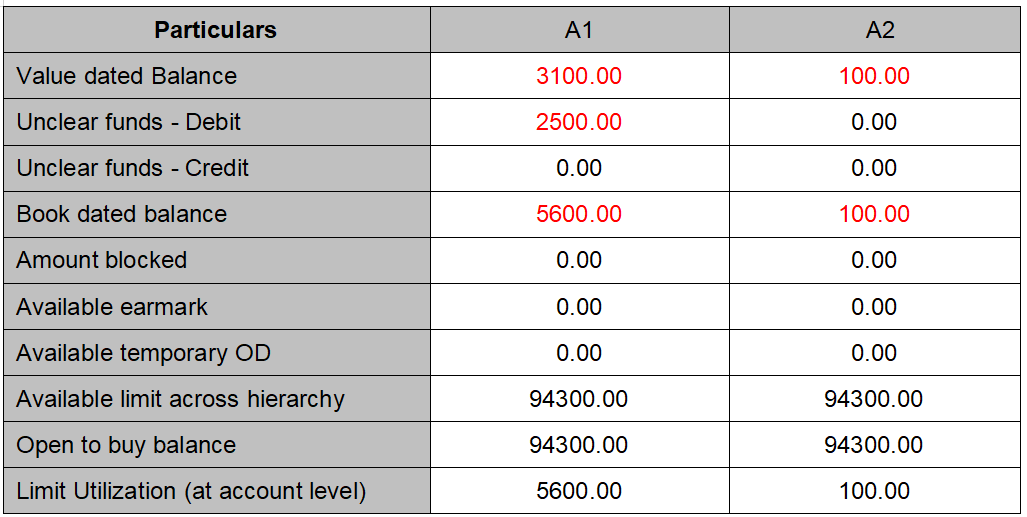
Debit future value transaction for 2000.00 from Account 2 and no transactions to account 1, the impact is
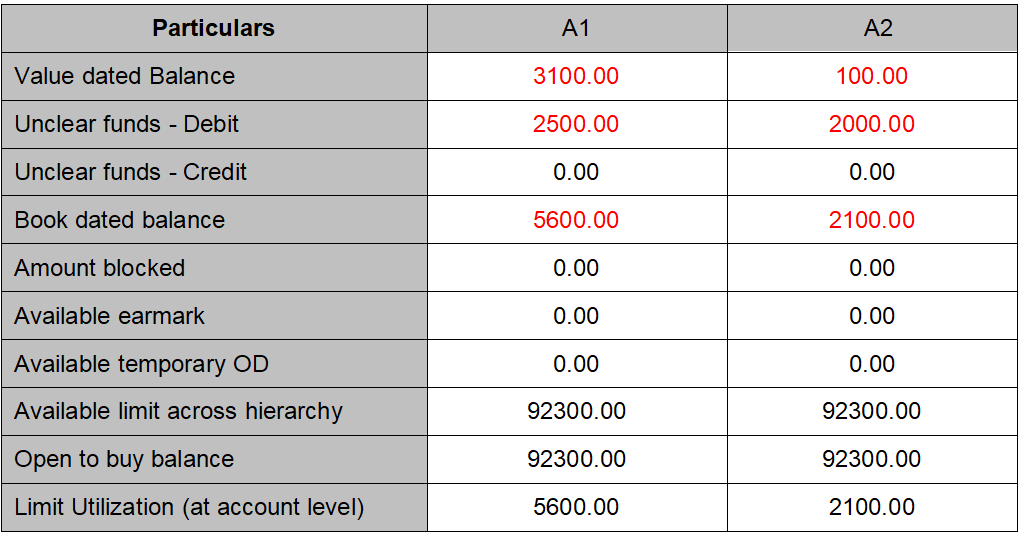
Payment for 1500.00 from Account 2 and no transactions to account 1, the impact is
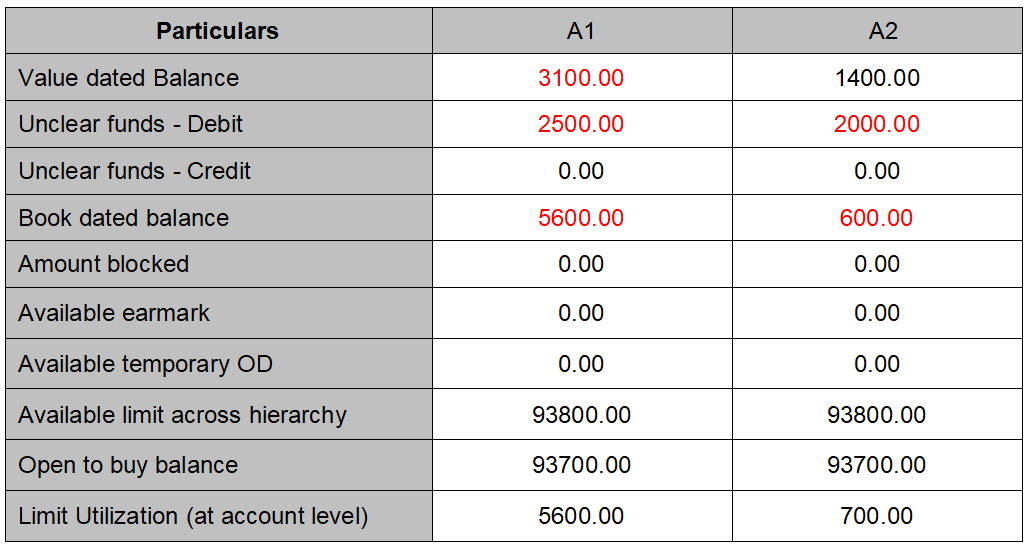
Account # - A1
Limit ID -- L1
A card account is created and a debit transaction is posted to account which has affected the limit utilization.
All values are in EUR. Amount mentioned in RED color indicated the debit balance.
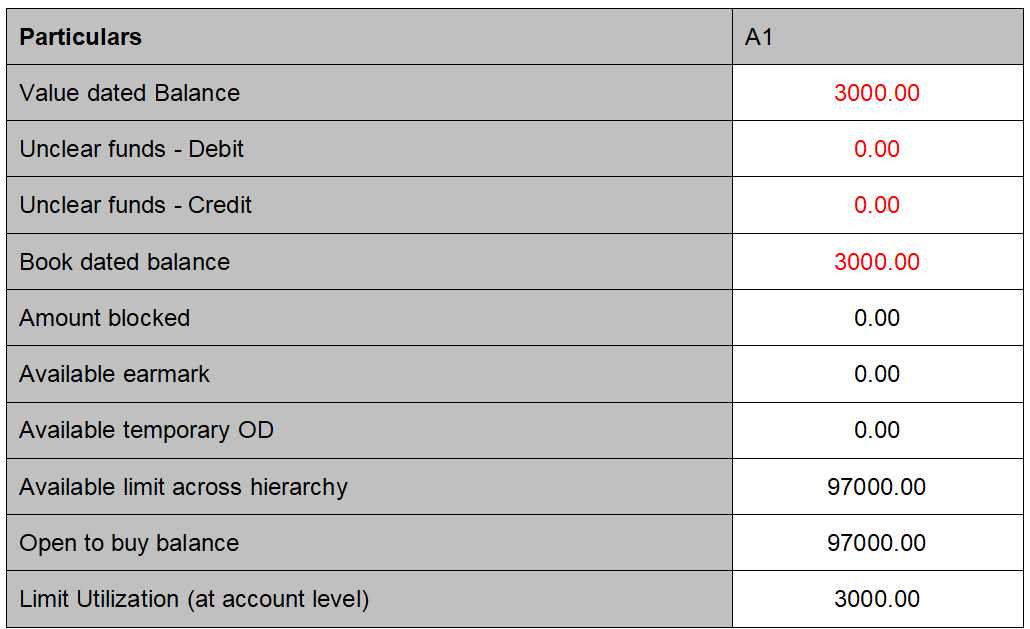
Attach this limit to the card loan account.
Account # - A2 and loan amount = 45000.00 and attached limit = 97000.00
Limit ID L1 -- Shared
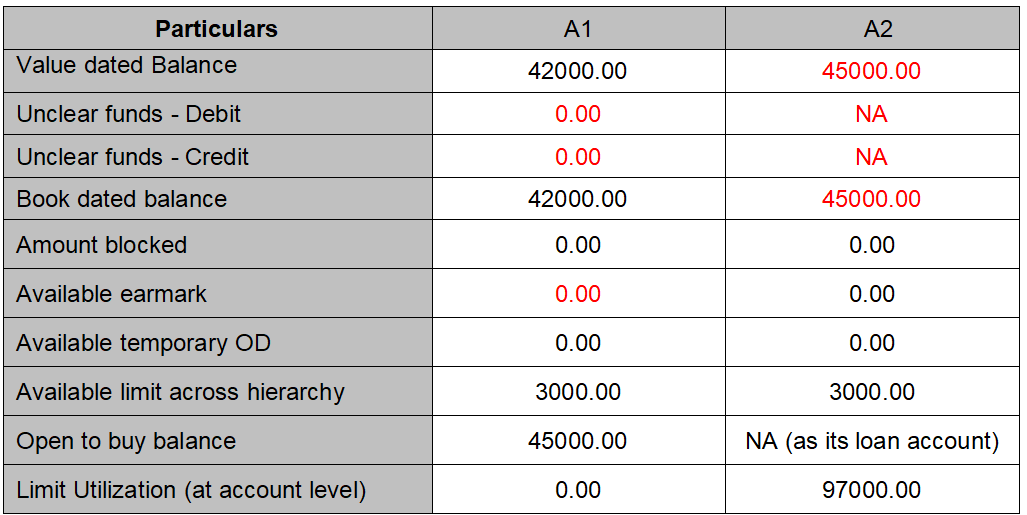
This scenario explains impact of:-
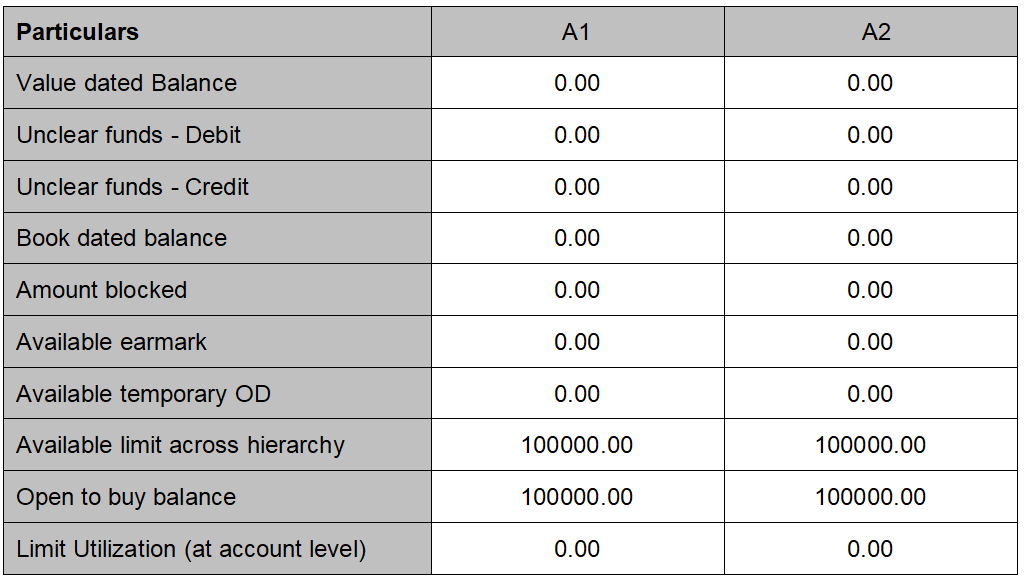
Current dated debit, future dated debit, credit transactions more than debit; on the limit utilization for allocated limit.
Account # - A1
Limit ID -- L1 (Parent limit)
Account # - A2
Limit ID -- L2 (Child limit)
Both accounts are created no debit or credit has happened then starting balances are
All values are in EUR. Amount mentioned in RED color indicated the debit balance.
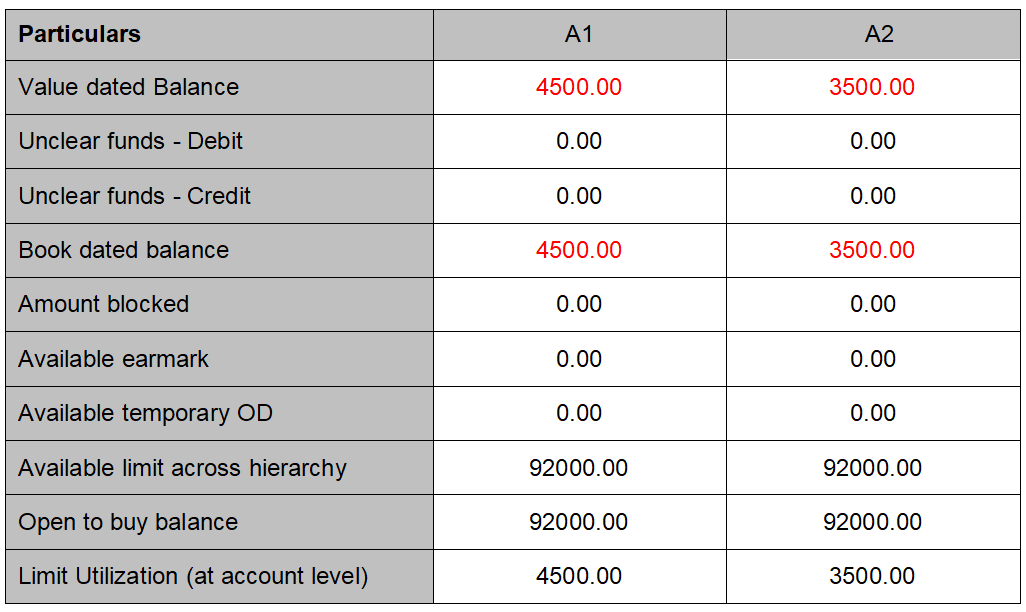
Current dated debit to the Account1 for amount 4500.00 and 3500.00 to Account 2, the impact is,
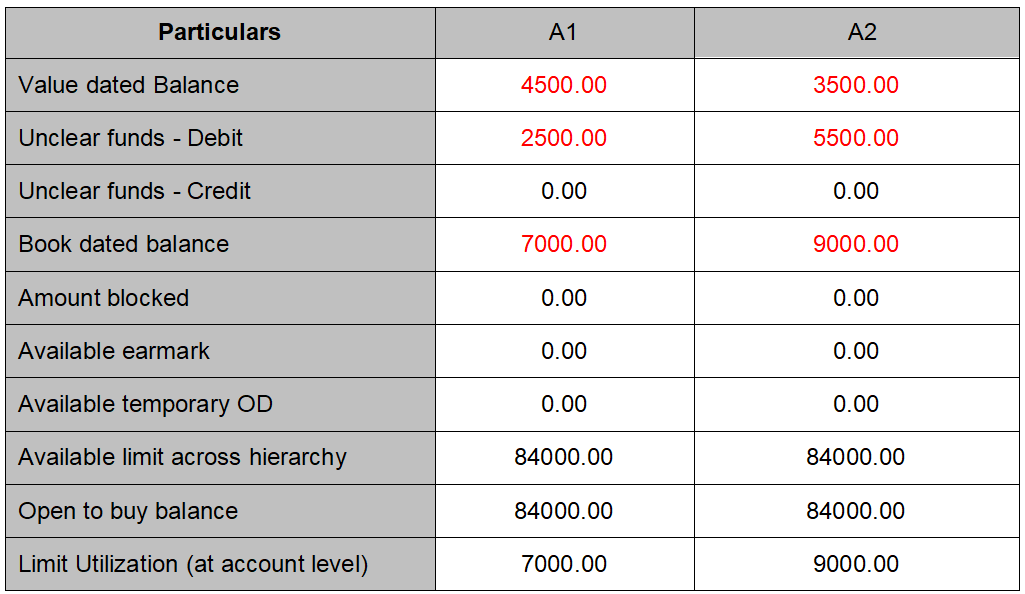
Future dated debit to the Account1 for amount 2500.00 and 5500.00 to Account 2, the impact is,
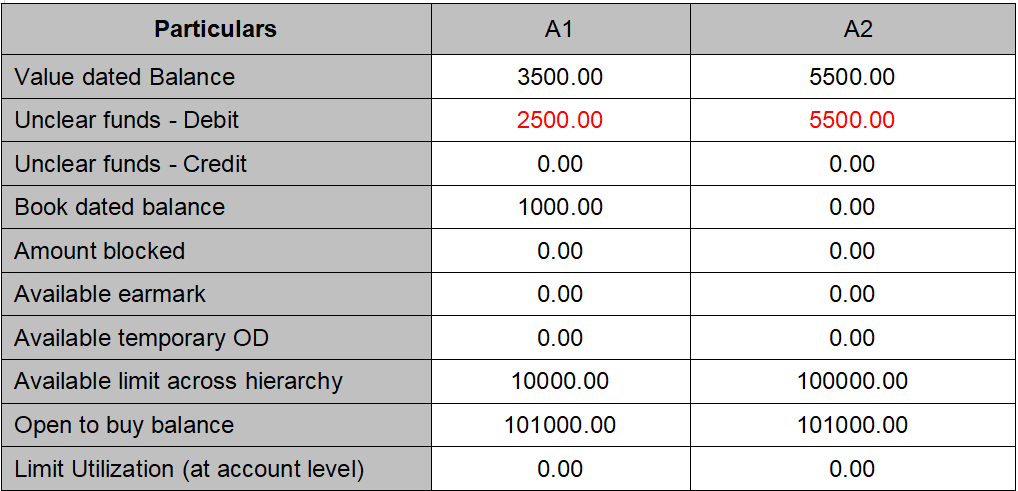
Credit transaction on the Account 1 for 8000.00 and Account 2 for 9000.00, the impact is
For Account 1 -- the credit is more than the utilized limit so open to buy balance shows more than allocated limit.
For Account 2 -- the credit is same as debit so it nullifies and hence open to buy balance is same as limit.
This scenario explains impact of amount block creation, suspension of amount block, on the limit utilization.
Account # - A1
Limit ID -- L1 (Parent limit)
Account # - T1
Limit ID -- L2 (Child limit)
Both accounts are created no debit or credit has happened then starting balances are as shown in below table. All values are in EUR. Amount mentioned in RED color indicated the debit balance.
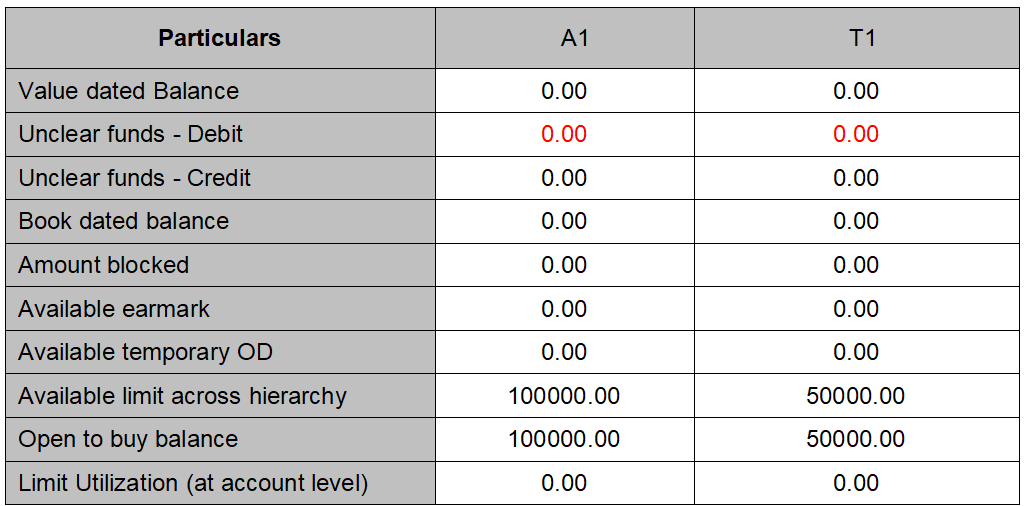
Current dated debit the Account 2 (Transaction Account) with 2500.00, the impact is
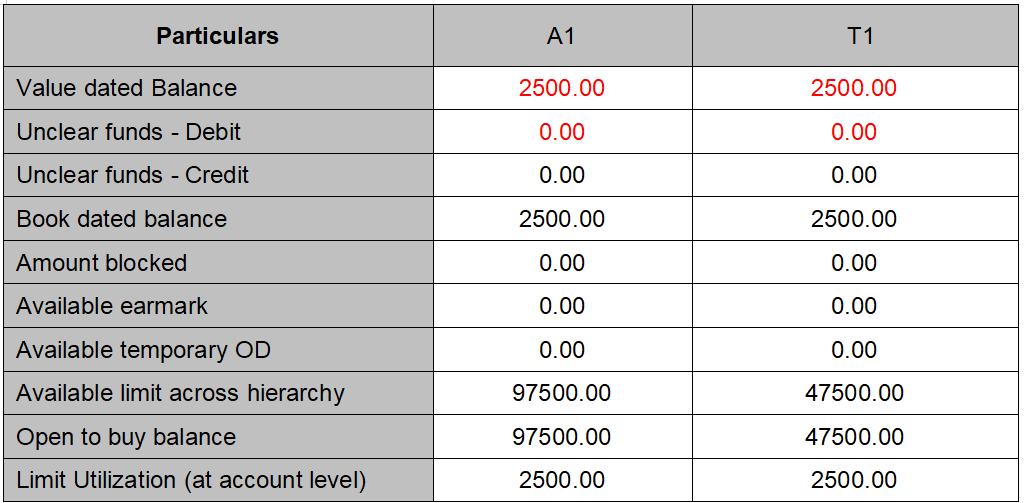
Future dated debit to the Account 2 (transaction Account) with 48000.00. This will make transaction account to go to over limit. But Billing account shows remains within limit.
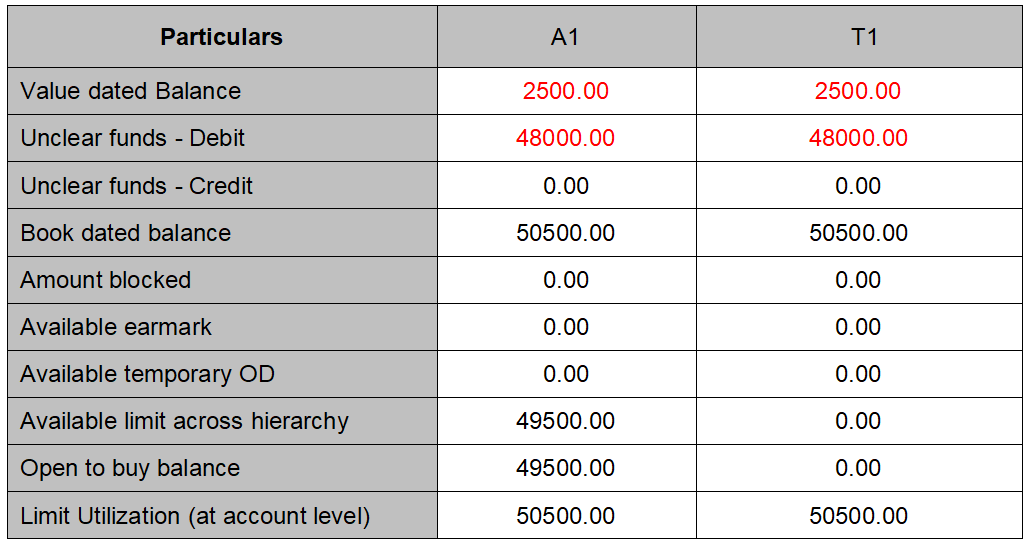
This scenario explains the Impact of earmark (Creation, Utilization, over utilization, Suspension and Expiry) and debit transactions on limit utilization.
Account # - A1
Limit ID - L1
Total Limit amount -- 100000.00 EUR
Available Limit amount -- 100000.00 EUR
Account # - T1
Limit ID -- L1
Total Limit amount -- 100000 EUR
Available Limit amount -- 100000 EUR
Below mentioned table explains different transaction activities and their respective impact on Limit Utilization.
All values are in EUR. Amount mentioned in RED color indicated the debit balance.
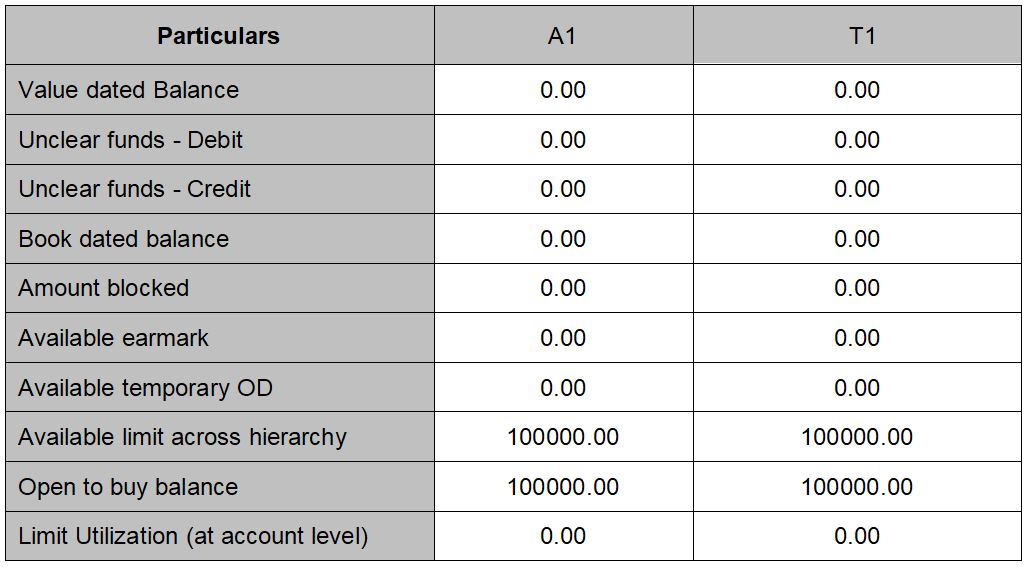
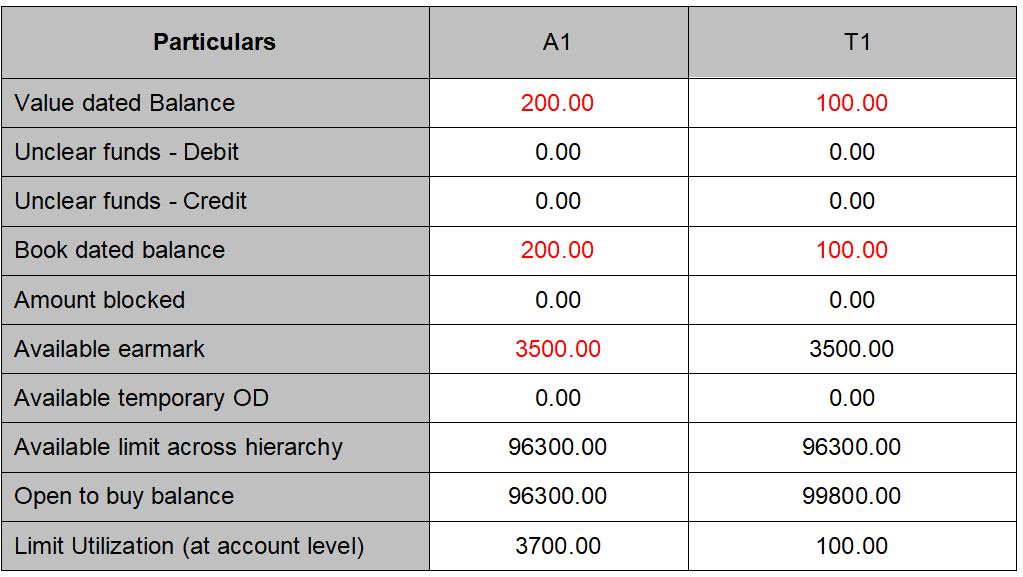
Account opening fee has being debited from both accounts, the impact is.
When debit comes to Billing Account it affects the limit utilization at only billing account but when debit comes to transaction account it affect the limit utilization to both.
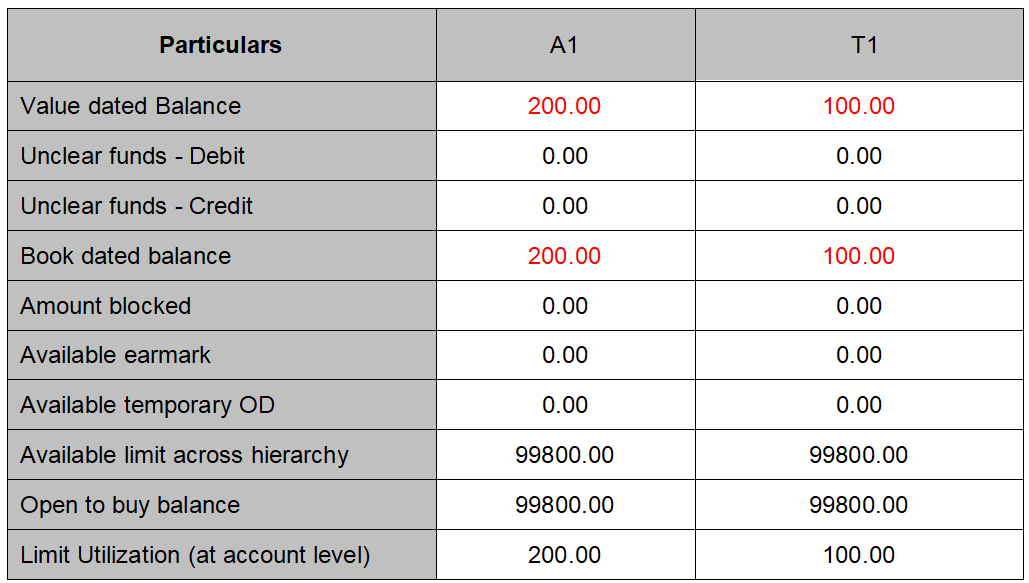
Earmark the amount 3500 from Account 1 to Account 2. Earmark increases the limit utilization for the Billing account but it does not impact for the transaction account.
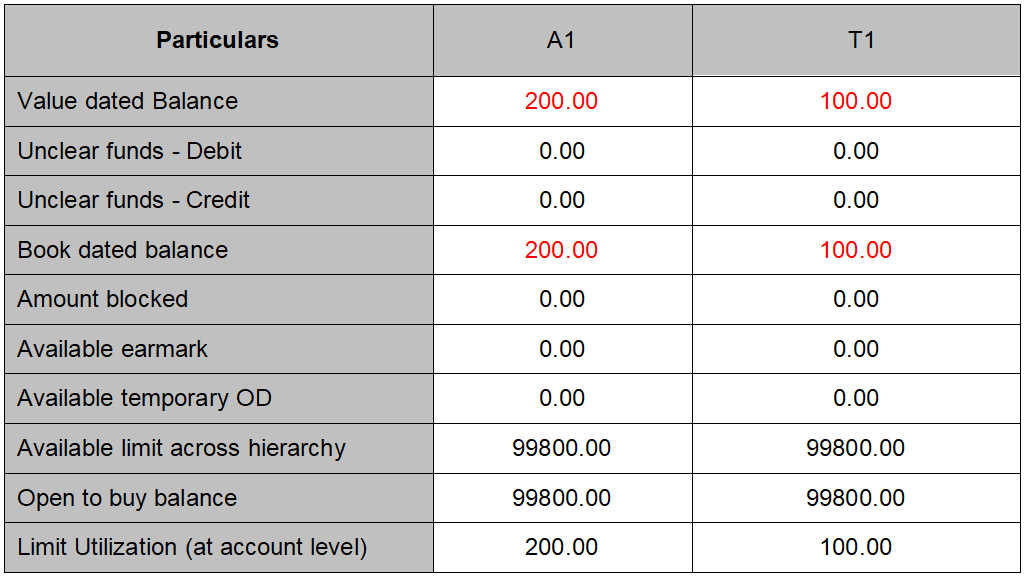
Earmark is expired and if it has not being used by transaction account; the impact of it is,
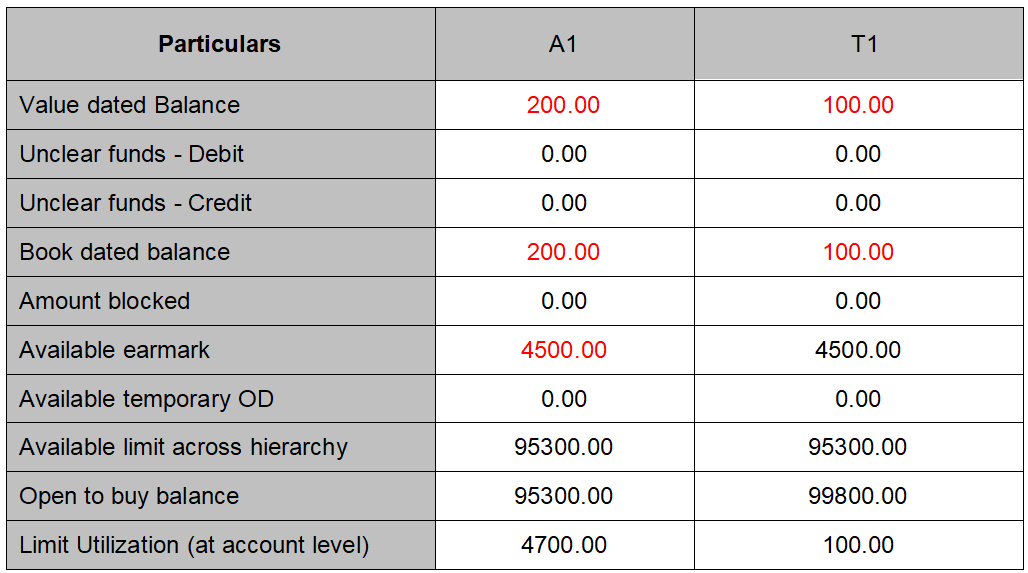
Earmark the amount 4500 from Account 1 to Account 2. Earmark increases the limit utilization for the Billing account but it does not impact for the transaction account.
Suspend the attached earmark. The impact is it releases earmarked amount hence decreases the limit utilization at billing account.
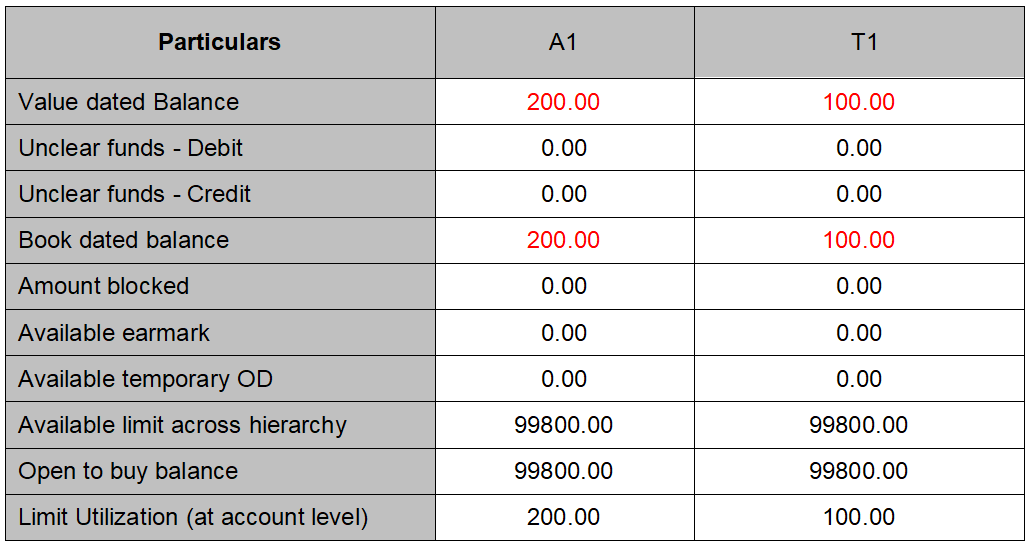
Earmark the amount 5500 from Account 1 to Account 2. Earmark increases the limit utilization for the Billing account but it does not impact for the transaction account.

Current value dated debit transaction for 2700.00 is posted to billing account, the impact is Earmark is not being utilized, Limit utilization is affected.
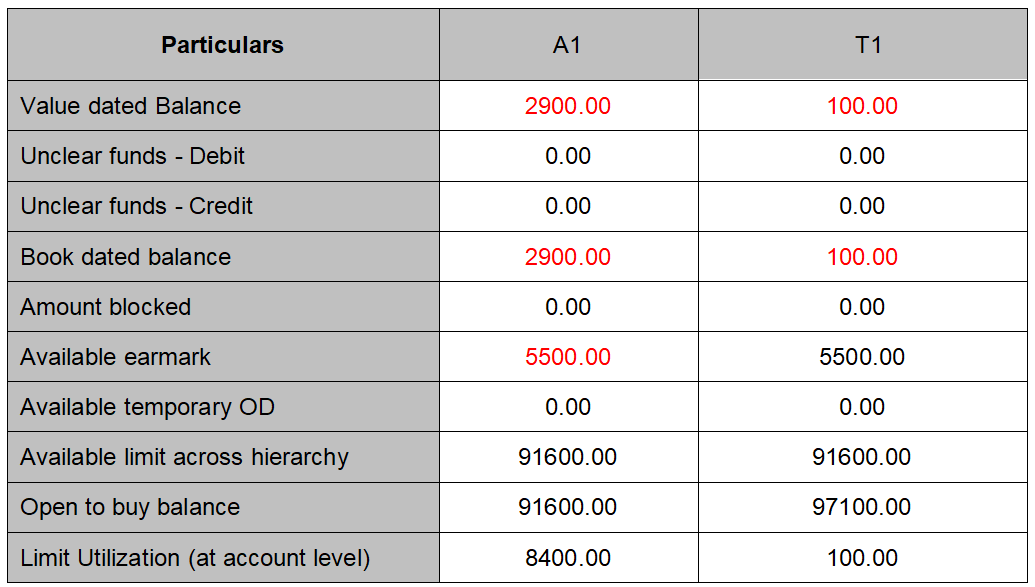
Current value dated debit transaction for 2000.00 is posted to transaction account, the impact is.
Limit utilization at both accounts does not change as the debit transaction is within the available earmark amount.
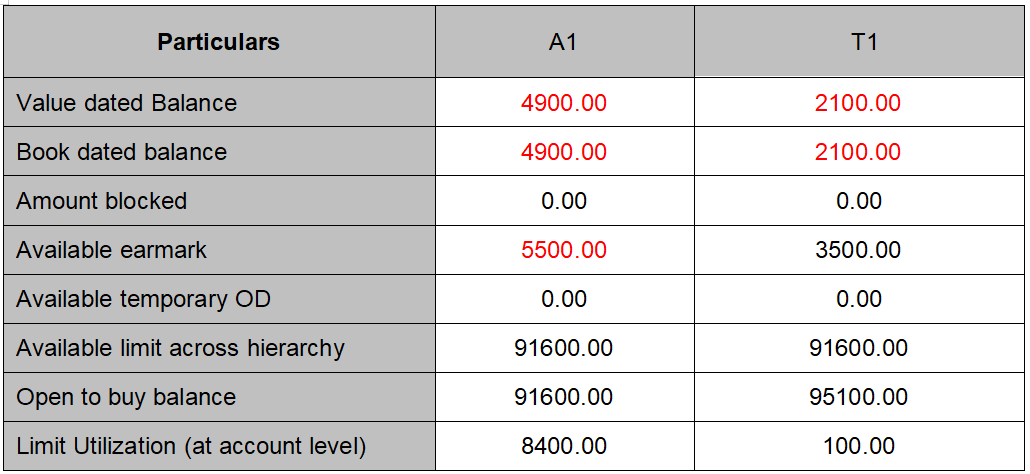
Current value dated debit transaction for 4000.00 is posted to transaction account, the impact is. Limit utilization at both accounts changes with value more than allocated earmark. Available earmark at billing account does not change; it only becomes zero on expiry. Available earmark at transaction account becomes zero.
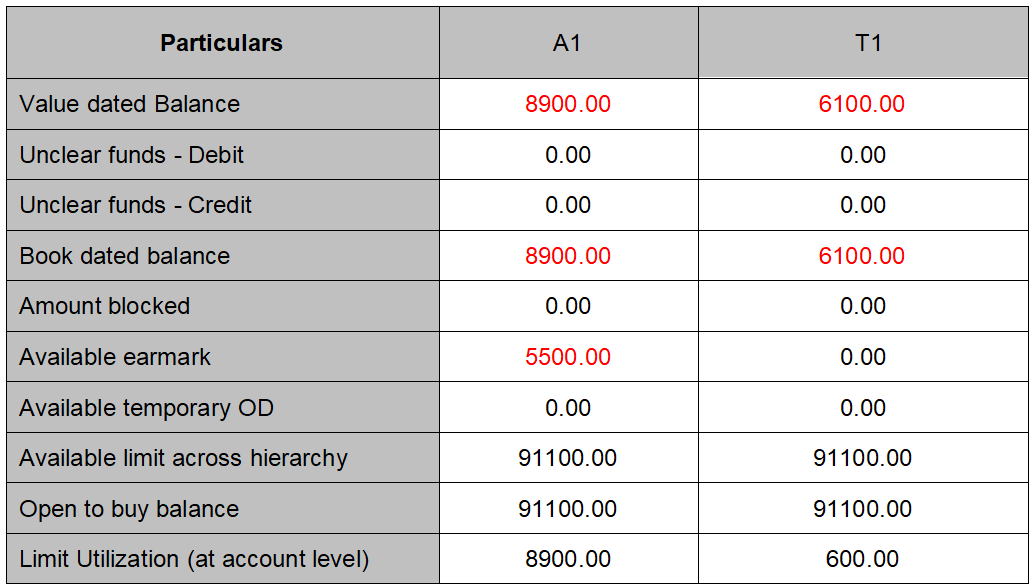
This scenario explains impact of amount block creation, suspension of amount block, on the limit utilization.
Account # - A1
Limit ID -- L1 (Parent limit)
Account # - A2
Limit ID -- L2 (Child limit)
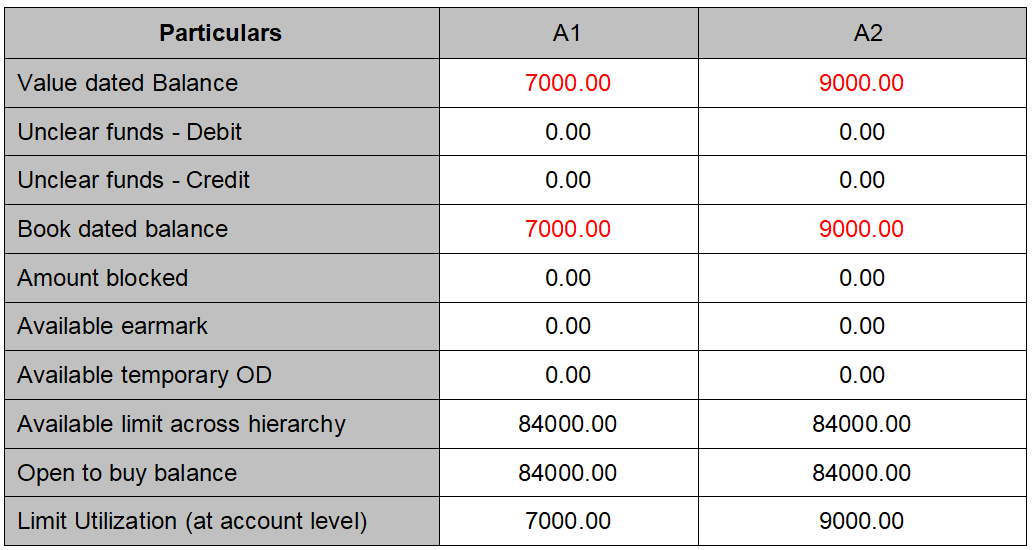
Both accounts are created Account has debit balances, starting balances are as shown in below table.
All values are in EUR. Amount mentioned in RED color indicated the debit balance.
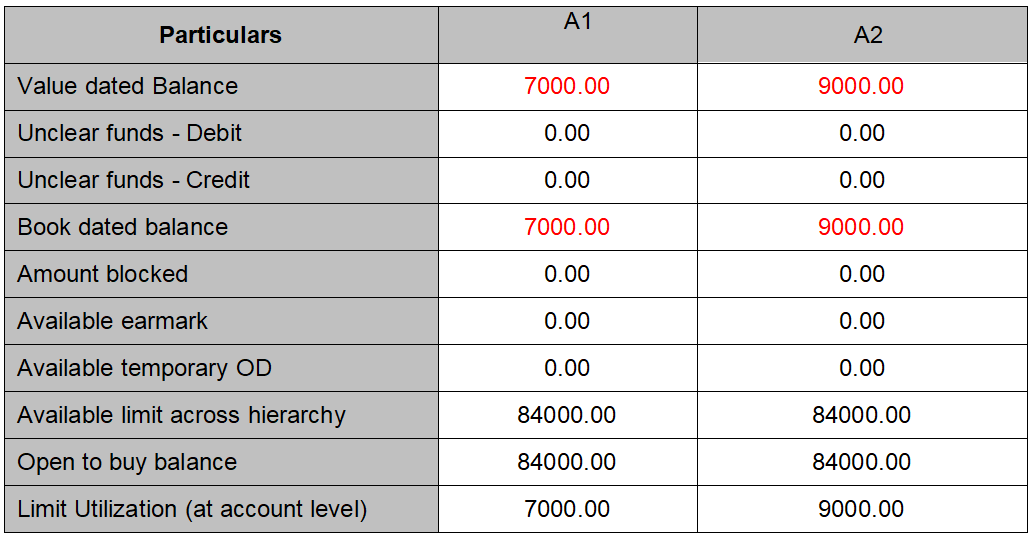
Create Amount block to the Account1 for amount 2700.00 and 1500.00 to Account 2, the impact is, Amount block increases the limit utilization.
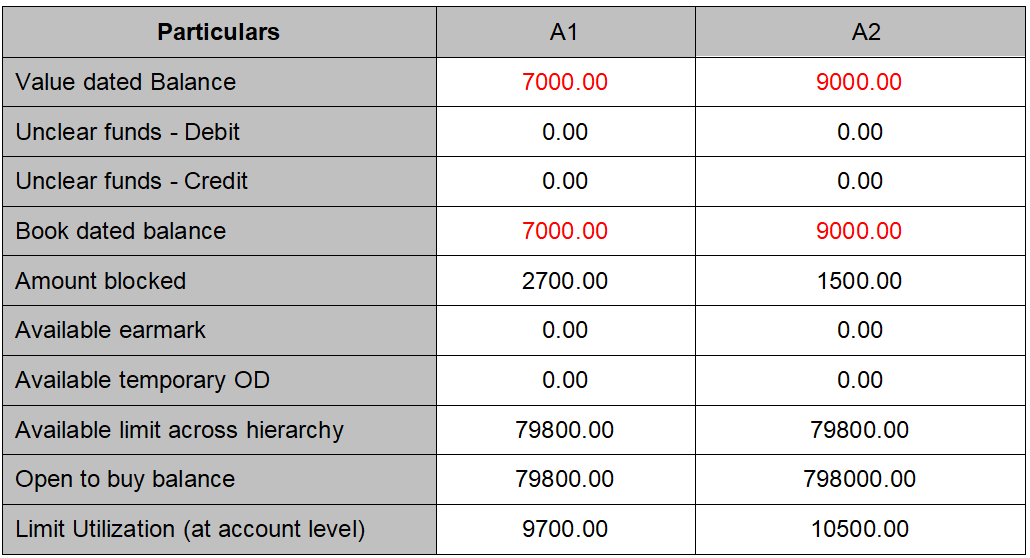
Suspend amount block to the Account1 and Account 2's amount block expires, the impact is, the expiry or suspension of earmark brings back the utilized limit,
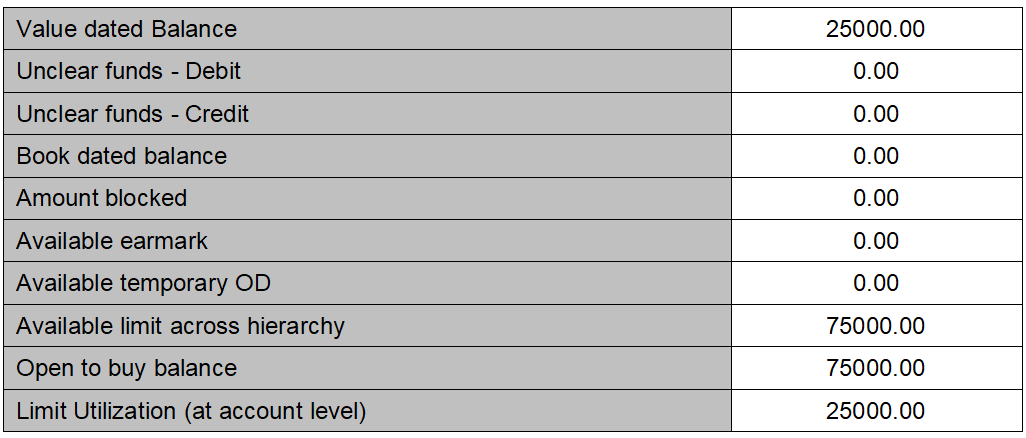
This scenario explains impact of Temporary overdraft expiry on limit utilization
Account # - A1 Limit ID -- (L1) 100000.00 and Temporary Overdraft = 25000.00
All values are in EUR. Amount mentioned in RED color indicated the debit balance.
Starting balances are:-
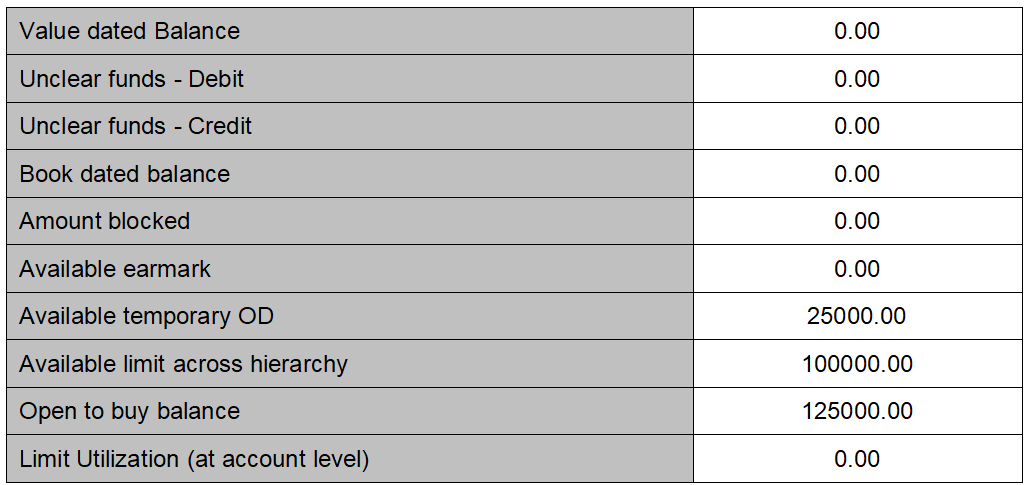
Put the debit balance for 25000.00 at the account, the impact is:-
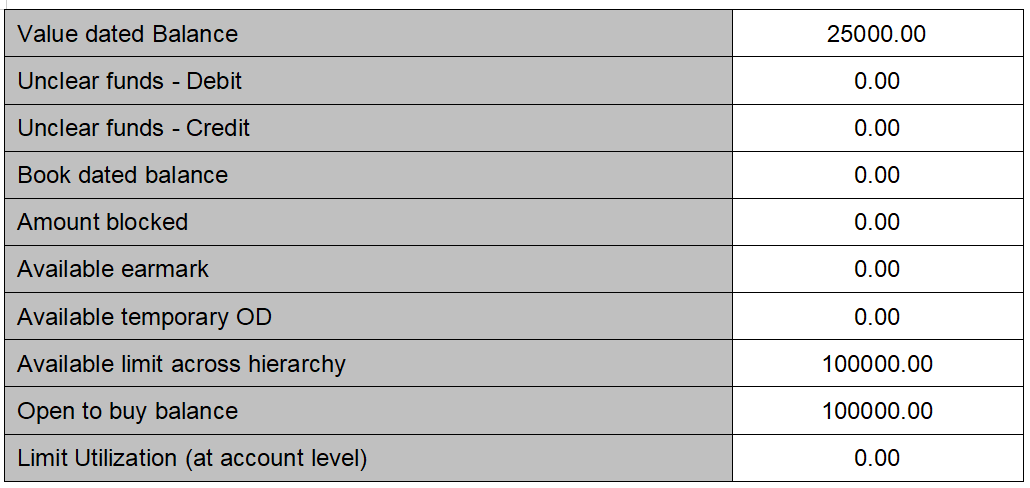
Temporary overdraft is expired, the impact is , it increases the limit utilization by amount = expired OD amount.
Account # - A1
Limit ID -- L1
Authorization Buffer settings are:-
Authorization buffer of 10 % and Buffer amount ceiling = 500.00
All values are in EUR. Amount mentioned in RED color indicated the debit balance.
Starting balances are:-
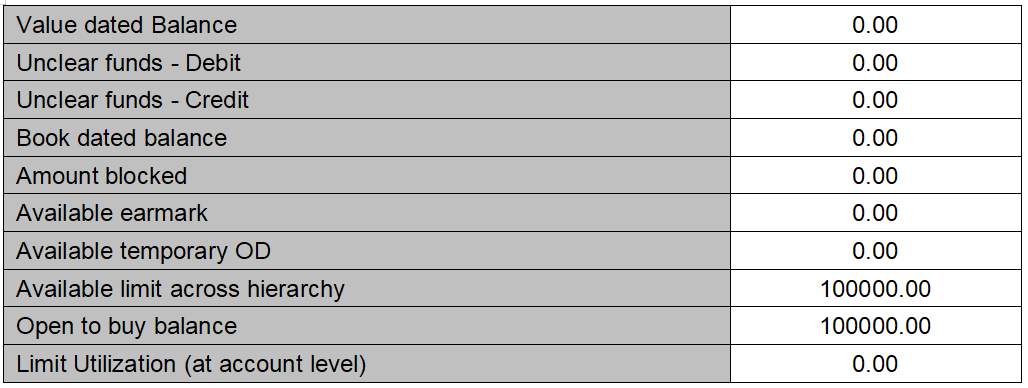
Debit current value dated transaction into the account for 5000.00 EUR. The impact is,
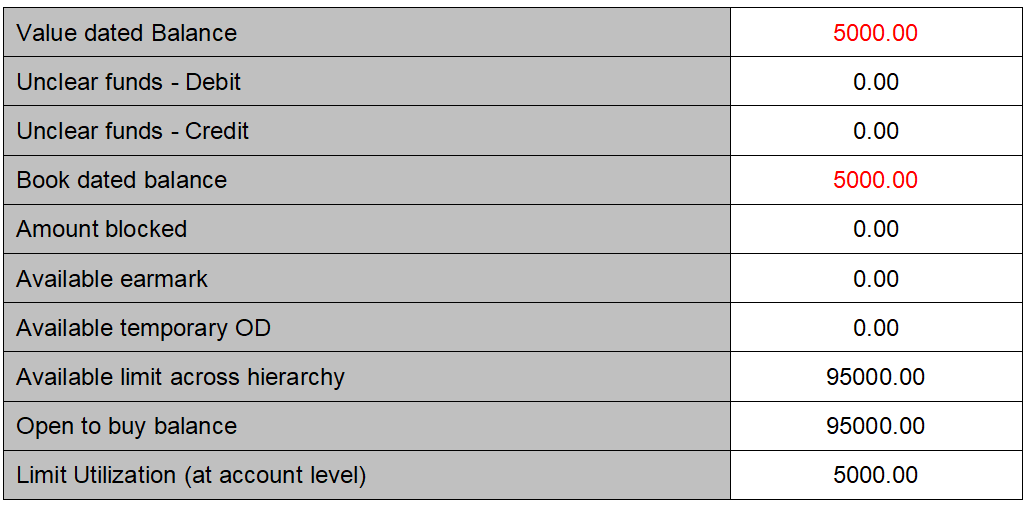
Try creating amount block into the account for 95600.00.The transaction does not go through as it breaches the Authorization buffer. Application displays indicative error message provided the block category has balance check.
Create amount block for 95500. The transaction go through the impact on the limit utilization is,