
EOC Details
The EOC Details screen is used to monitor and suspend End of Cycle (EOC) operations for each branch (maintained under Admin > Branches > Maintain). This functionality enables authorized users to view and suspend EOC processes whenever required.
The EOC process includes various operations such as Beginning of Day (BOD) and End of Day (EOD) tasks that are managed at the branch level. The Suspend functionality allows administrators with the proper rights to temporarily halt EOC processes for one or more branches as required.
To View the EOC Details,
1. From the Admin menu, click on Branches and then EOC details. The EOC Details page appears.
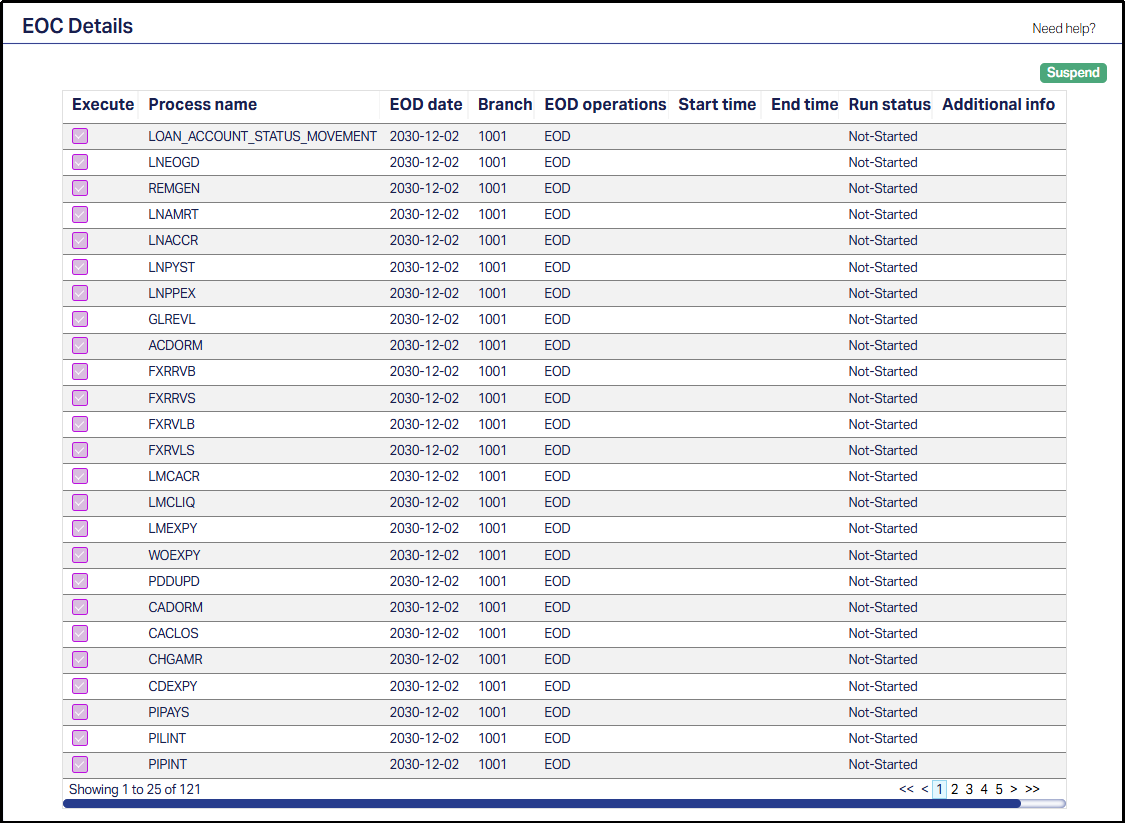
A grid is displayed which shows the EOC processes configured for each branch.
2. The displayed table/grid has the following fields:\
Note: Only one field, the Execute check-box, can be selected/actioned. All the other fields are in view mode, and are displayed only for monitoring purposes.
Execute: This check-box allows the user to select one or more EOC processes for the purpose of suspension. When the Suspend button is clicked, the system suspends all selected/checked processes.
The Execute check-box does not trigger execution. It is simply used to select which processes are selected for suspension.Process name: This displays the system-defined name of the EOC process configured for the branch.
The process names are already pre-defined during the configuration and set-up of the EOC processes at the system-level.EOD date: This shows the business date for which the EOC processes are running or scheduled. It reflects the branch’s current operational cycle.
Branch: This indicates the branch code, associated with a particular branch from which the EOC processes belong to. Each branch operates its own independent End-Of-Cycle sequence.
EOD operations: This specifies the type of operation related to the listed process; typically BOD (Beginning of Day) or EOD (End of Day). The user cannot initiate or alter any operations from this page.
Start time: This displays the system timestamp when the execution started for the process.
End time: This displays the system timestamp when the selected EOC process completed execution.
Run status: This indicates the current execution status of the EOC process. Common statuses include Not-Started, In-Progress, Completed, Suspended, and Failed.
Additional info: This displays supplementary information or messages generated during execution (for example, completion notes, error details, or status comments).
Notes:
- The Approve function is not part of the EOC Details user interface.
- The Suspend function is available only to users within the Super role group or equivalent roles with administrative privileges.
Suspend
The Suspend functionality ensures controlled halting of EOC operations without data corruption or transaction inconsistency. It allows the user to pause all selected EOC operations for the branch.
When the selected processes have EOC operations in the Not-Started status, the Suspend button is enabled. Once the Suspend button is clicked, all the selected processes will be suspended, preventing further execution until resumed by authorized users.
The Suspend functionality is only available to specific roles that have been permitted to control EOC operations.
The Suspend button will be disabled automatically when:
- The User’s Role does not have the requisite Suspend rights, as maintained in Admin > Users > Roles > Contexts Tab.
- The EOD Status is set to BOD_END (i.e., the branch’s Beginning of Day process is already completed, and the End of Day has started). This ensures that suspension is only possible before the end of the current operational cycle.
Note: The EOD Status does not appear as a separate field on the EOC Details page. The EOD Status is maintained at the system level.